
General
513 files
-
.thumb.png.65d19292e8b5f40219e95e1e60db83a9.png)
Atomic Planet Widescreen Fix
By zoli456
This file contains a widescreen fix for games made by Atomic Planet Entertainment. Unpack it into the game folder then configure the settings using the configuration utility. I didn't test with all games but most of them should work.
Features:
Fix the resolution Field of view scaling Limit the framerate to 60 in older games In-game FOV changer Default keybindings for the in-game FOV changer:
/ enable the scaling * disable the scaling + increase the fov - decrease the fov101 downloads
0 comments
Updated
-
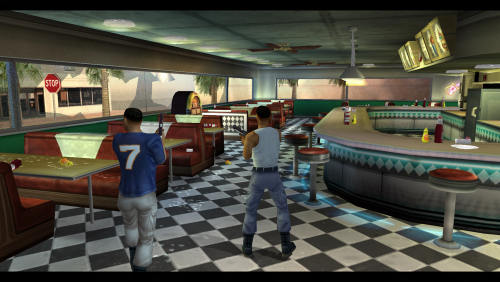
Bad Boys: Miami Takedown Fixer
By zoli456
This fix contains improvements for a game called: Bad Boys: Miami Takedown. Use a DRM free version of the game. Unpack the archive into the game folder.
Features:
Resolution selector unlocked Fps limit changer Fov changer and ability to set a multiplier58 downloads
- resolution fix
- fov fix
- (and 1 more)
0 comments
Updated
-
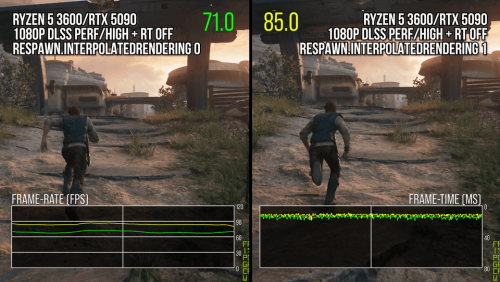
Star Wars Jedi: Survivor - Camera and Animation Stutter Fix
By atlash
This mod enables a custom variable that helps with camera and animation stuttering in the game. No additional tools needed.
The existence of this variable was discovered by Alex Battaglia from Digital Foundry's team. You can read the full article and watch the video about it here
Unzip and drop the files in the game's executable folder ( <path-to-game>\SwGame\Binaries\Win64). The fix comes enabled by default but you can use SurvivorAnimationStutterFixLite.ini to disable / enable the fix or the logging. This mod is developed for Patch 9.
Use Version 1.1 if you're having problems enabling the mod with 1.2. This older version uses a different injection method based on UE4SS instead of memory injection. It includes a lightweight version of this program needed to run the console and set the variable to 1.
Thanks to ThirteenAG for Ultimate ASI Loader as it is used as dll injection method and to UE4SS project for the alternative method.
The lifelong battle against stuttering is a heavy burden, but it ultimately yields magnificent results.
1,833 downloads
Updated
-
Soul Reaver 2 trailer
By if_and_while
Video file extracted from the retail release of Blood Omen 2.
This file prevents crashes during playback in digital distribution versions.
Copy the file into the data folder.
40 downloads
0 comments
Submitted
-
Audio file for Dino Crisis 2 (Steam/GOG + Classic REbirth)
By if_and_while
Audio file extracted from the retail version of Dino Crisis 2.
This file is required to prevent crashes when running the Steam/GOG.com version of the game with the Classic REbirth patch.
Copy the file into the Data folder.
126 downloads
- capcom
- dino crisis
- (and 3 more)
0 comments
Updated
-
Wild Wild West Fix for Windows 7+ text rendering
Wild Wild West Fix for Windows 7+ text rendering. To install:
Backup the "bin/gametext.ocx" file in the game's install directory. Copy the "bin" folder from inside the "Wild_Wild_West_The_Steel_Assassin_fix" into the file to the game's install directory and let it overwrite the backed up gametext.ocx file. Play (the game may require further fixes as mentioned on its main page).34 downloads
0 comments
Updated
-
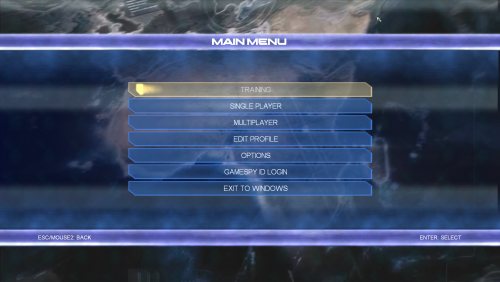
Pivotal Games Fixer
By zoli456
This file contains improvements for games made by Pivotal Games. Copy the data from the corresponding folder into the selected game. Start the game with admin rights.
Common Features:
Resolution selector unlocked FOV scaling and optional multiplier in the scripts/ConflictFixer.ini The game won't disable certain settings if you use dgvodoo Initial Discord rich presence support Contains wrappers to fix compatibility problems Conflict: Desert Storm
Framerate limited to 60 to prevent timing anomalies It disable the framelimit on the loading screen to decrease loading times Conflict: Desert Storm 2
Framerate limited to 60 to prevent timing anomalies The main menu slightly changed to fix the misaligment on widescreens Conflict: Vietman
Framerate limited to 60 to prevent timing anomalies Upscaled video pack available here Installing the upscaled video pack raise the frame limit in the main menu 25->60 Conflict: Global Storm (Global Terror)
Multiplayer restored via Openspy Automatic portforwarding using UPnP The game uses bigger fonts in unsupported resolutions Upscaled video pack available here Installing the upscaled video pack raise the frame limit in the main menu 25->60 Conflict: Denied Ops
Multiplayer restored via Openspy Automatic portforwarding using UPnP The Great Escape
Skip the company logos Framerate limited to 60 to prevent timing anomalies The game doesn't skip rendered videos Fix the journey and the page turn animation Upscaled video pack available here Notes: The manual video skipping in The Great Escape may require 2 or more slow mouse clicks. Using BandiCam tend to cause crashes.
586 downloads
- openspy.net
- openspy
- (and 2 more)
Updated
-
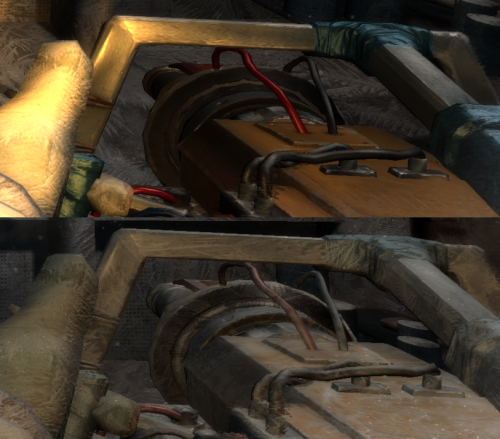
Cryostasis - Water gun frost
By contact5156
Replacement files for restoring frost on the water gun in Cryostasis.
59 downloads
0 comments
Submitted
-
Cryostasis - DP27 machine gun
By contact5156
Replacement files for restoring the DP27 machine gun in Cryostasis.
59 downloads
0 comments
Submitted
-
Resident Evil 0 HD Remaster - FPS Fix by megatenfreak
This archive contains a modified d3d9.dll that cuts down Internal Resolution by more than half for lower end machines. There are two 'modes' present which can be toggled by pressing the Right Shift key. According to the author:
There is a catch though:
Shadows seem to be completely disabled with no way to toggle them. The rendering resolution is reduced by a fixed amount with no way to adjust it. Will require the player to press Right Shift to toggle between two modes should there be visual glitches, though the author claims Mode 2 is close to perfect outside of a chance of Rebecca's hair bugging out. Credits:
megatenfreak: https://residentevilmodding.boards.net/thread/9676/low-fps-slow-motion-finally
378 downloads
- resident evil 0
- hd remaster
- (and 6 more)
0 comments
Submitted
-
music.rrc
By frenchmember
file modifiedwith hexadecimal editor (solution here https://www.vogons.org/viewtopic.php?p=1351954#p1351954 ) to have music ingame with drakan in windows 11
74 downloads
0 comments
Submitted
-
Code Vein 2 cutscene fps fix
By SkacikPL
ASI injectable patch that removes 30fps limit of cutscenes.
139 downloads
0 comments
Submitted
-
Arabian Nights DgVodoo fix
By gmp
Fix for GOG version of Arabian Nights not launching in latest Windows versions. Extract these files to the same folder that contains "_start.exe".
64 downloads
0 comments
Submitted
-

Full Spectrum Warrior - FOV Fix
By AlphaYellow
Comes with a RAR file, which includes an ASI plugin intended to fix the aspect ratio and field of view in the third-person tactical shooter game "Full Spectrum Warrior" (2004), since the game stretches the view at resolutions with an aspect ratio wider than 4:3.
Source code available here: https://github.com/alphayellow1/AlphaYellowWidescreenFixes/blob/main/source/fixes/FullSpectrumWarriorFOVFix
Instructions:
1. Extract all files to the game folder.
2. Download ThirteenAG's Ultimate ASI Loader (32-bit version of dinput8.dll), and also extract it to the game folder.
3. Set the desired FOV factor in FullSpectrumWarriorFOVFix.ini.
234 downloads
0 comments
Updated
-

Barnyard - Widescreen & FOV Fix
By AlphaYellow
Comes with a RAR file, which includes an ASI plugin intended to fix the resolution, field of view and HUD in the third-person adventure game "Barnyard" (2006), since the game only supports limited 4:3 resolutions by default. It works with the US English, EU Multilingual and Russian versions.
Source code available here: https://github.com/alphayellow1/AlphaYellowWidescreenFixes/blob/main/source/fixes/BarnyardWidescreenFix
Instructions:
1. Extract all files to the game folder.
2. Download ThirteenAG's Ultimate ASI Loader (32-bit version of dinput8.dll), and also extract it to the game folder.
3. Set the desired resolution and FOV factor in BarnyardWidescreenFix.ini.
4. In (path-to-game)/Setup/, open Setup.exe, set the resolution to 800x600 and apply it.
397 downloads
0 comments
Updated
-
Martha Is Dead - Intro skip
By Mastan
Information
Blank intro video for the Martha Is Dead.
Installation
Copy the attached MIDIntro.mp4 file into the <path-to-game>\MID\Content\Movies\ folder, replacing the existing file.
68 downloads
0 comments
Updated
-
CSI-Dark Motives Language Fix
By KyleStilkey
There was a bug in this game where the subtitles may change to a different language. If you are affected by this, replacing these files will fix the problem.
This was originally fixed by Ubisoft back in 2006 under their FAQ page but no backup was made of the fix, but thanks to the user Finderr over on neoseeker, they backed up the fixed files from their install in 2021, I just repackaged everything into the correct folders to make things easier.
152 downloads
0 comments
Submitted
-
Beyond Good and Evil - Linux Proton Cutscene audio/video desynch fix
By goodluke
At least in my case, it fixed desynchronized audio, on Fedora 42, running BGE from Heroic Launcher, GOG version.
All you need is to put this .dll file to the game's folder, near .exe
All credits go to user LiefLayer from the GOG forum. He posted it in 2015.
Source: https://www.gog.com/forum/beyond_good_and_evil/cutscene_audiovideo_sync_fix
108 downloads
0 comments
Updated
-
Star Wars Jedi: Survivor - Broken Textures Fix
By Waschbär
After Patch 9 (current version) users with 8 GB VRAM or less may experience broken textures and meshes in the game.
To fix this use one of the three files provided and extract it to "<gamedirectory>\SwGame\Content\Paks\".
The following files are included:
z_targetheadroom.pak
The main fix: Keeps everything default but sets MemoryTargetHeadroomMb to 100MB. Normally defaults to "0".
z_targetheadroom_lowered_textures.pak
Same as above but with lowered texture resolution because the in-game texture setting is broken when this bug occurs and users with low-end GPUs may want improved performance.
z_improved_meshes.pak
Keeps the low-res textures but gives meshes its own memory space to fully load. So vegetation and objects load correctly but the textures are still broken (which in turn provides a higher performance).
925 downloads
- star wars
- texture fix
- (and 1 more)
0 comments
Submitted
-
Sinking Island lip-sync fix
By asder216
Fix taken from: https://steamcommunity.com/sharedfiles/filedetails/?id=866909648
On Sinking Island's Steam edition the mouths don't move, the fix is to change the following file, taken from the French demo of the game.
53 downloads
- sinking island
- steam
- (and 4 more)
0 comments
Submitted
-
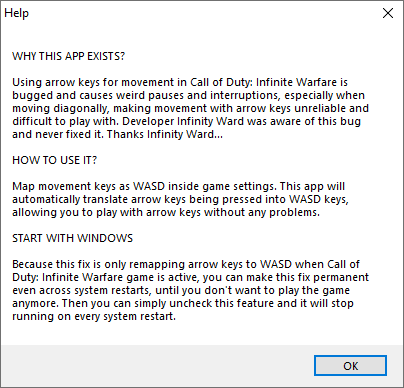
Call Of Duty: Infinite Warfare Arrow Keys Fix
By roph
Call Of Duty: Infinite Warfare has an unfixed issue when using arrow keys as movement, inputs will overwrite each other making things like strafing or moving diagonally very difficult or impossible.
This small tool runs in the system tray and dynamically translates arrow key input to WASD (which doesn't have bugged input), only while playing COD:IW.
71 downloads
0 comments
Submitted
-
FEAR 2 Multiplayer fix
By zoli456
This patch restores the multiplayer functionality in FEAR 2 via OpenSpy.
Unpack it into the installation directory.
93 downloads
0 comments
Submitted
-
Dirt 3 Offline GFWL profile FIX
By Arhandir
If you have a retail or digital DiRT 3 copy that uses Games for Windows LIVE and did not have a GFWL product key (or it was used beforehand), the game doesn't allow to create a in-game profile to save progress. This ProfileImport solves the problem. Requires 1.2 patch.
*This fix is not mine. I don't take responsibility if it doesn't work.
*Tested on retail copy of Dirt 3 GOTY edition with patch 1.2.
*Readme inside zip file.
*password: pcgw
381 downloads
0 comments
Updated
-
Hitman Contracts - DirectX Fix (ASI Plugin)
By burntshrimp
Simple ASI script that scans Hitman Contracts in memory and patches two lines that break some graphical effects. For use with https://github.com/ThirteenAG/Ultimate-ASI-Loader/releases
More info on issues fixed: https://www.pcgamingwiki.com/wiki/Hitman:_Contracts#Enable_OpenGL_effects_in_the_Direct3D_renderer
https://www.vogons.org/viewtopic.php?t=66087
264 downloads
Updated
-
Tonka Construction .ini file
By beastybread
The .ini file that is required to install Tonka Construction on modern OS.
Copy
343 downloads
0 comments
Submitted
.thumb.png.65d19292e8b5f40219e95e1e60db83a9.png)
-
Top Downloads
Week
Month
Year
All Time
-
-
Download Statistics
-
-
Who's Online 6 Members, 0 Anonymous, 698 Guests (See full list)
-
Recently Browsing 0 members
- No registered users viewing this page.
-
Member Statistics
12,906
Total Members3,870
Most Online


-
File Comments
-
 It's best to use this fix alone and not together with the widescreen patch, right?
 -
 I also found out that for Netro 2033 Redux this parameter should be set to 0.55: sens 1.04999995 sens_border 0.55000001
 -
 Xator, thank you so much for your help. I didn’t reply earlier because I never received a notification. I’ll definitely give your recommendation a try. Kind regards, bro.
 -
 Can confirm that everything works. I was on Windows 10 when I wrote everything I have. Now I'm on an updated Windows 11 and everything still works. @maxkatsurTry going here to see if you like the way I describe the process: https://steamcommunity.com/app/12750/discussions/0/780947379776048803/ It is the same as here, but maybe you skipped something: Best of luck.
 -
Hi! It seems this issue is somehow related to difficulty modes. It's present on Survival + Ranger Hardcore, but not on Spartan + Normal. I found a solution: along with Metro Mouse Fix, edit user.cfg as follows: aim_assist 0. mouse_curve_coef 0. mouse_curve_num 0. sens_border 0.45 The "sens_border" parameter and value are the most important. At low values, when using the field tablet (compass), there's no mouse movement at all. At values of 0.5 and higher, the mouse moves very qui
-
-
Topics