




About This File
Disclaimer
This software is a modification for the game Dragon Ball Z Kakarot and is not affiliated with or endorsed by the Game developers or publishers.
Description:
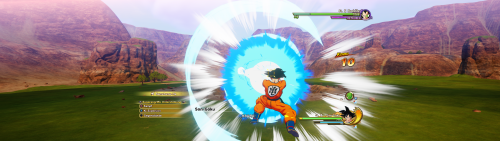
Adds native ultrawide support and fixes visual issues caused by extended aspect ratios.
Fixes:
- HUD scaling & centering
- FMVs
- Targeting system alignment
- FOV
Features:
- two FOV modes: auto and custom
- unlocked fps
- three choosable hud-ratios
Tested with the following aspect ratios: 16:10, 21:9, 32:9, 48:9
How to install
Windows:
- Extract the zip file to the game's installation directory. For HD remaster in ...\dlc\Remaster\AT\Binaries\Win64. For old version in ...\AT\Binaries\Win64.
- Enter your data in the .ini file and ensure width and height match your resolution. You can also change FOV, FPS and HUD settings here. Don't forget to save.
- Start the game.
Steam Deck/Linux:
- Extract the zip file to the game's installation directory. For HD remaster in ...\dlc\Remaster\AT\Binaries\Win64. For old version in ...\AT\Binaries\Win64.
- Enter your data in the .ini file and ensure width and height match your resolution. You can also change FOV and FPS settings here. Don't forget to save.
- Open the game properties in Steam (Right-click game -> Properties).
- Under General -> Launch Options, paste exactly this command: WINEDLLOVERRIDES="winmm=n,b" %command%
-
Start the game.
Additionally:
To ensure having better performance start the game with dx12 by using the following start command in steam launch option: -d3d12
For steam deck/linux you need to paste this command with a space after the %command%
If something isn't working, feel free to leave a comment here or in the WSGF Discord.
How to uninstall
Delete the mod files from the game directory.
Requirements
Latest Steam version of the game.
Support my work
Developing complex logic and maintaining updates takes a lot of time and coffee. If this mod improved your game experience, consider buying me a coffee! It helps me keep going and working on fixes for future games.
What's New in Version 1.0.2
Released
- fixed UI issues with base version - steam deck 1280x800

.thumb.png.573424dca099f94733865bd8286986b1.png)


Recommended Comments
Join the conversation
You can post now and register later. If you have an account, sign in now to post with your account.