
Search the Community
Showing results for tags 'aspect ratio fix'.
Found 11 results
-
Fix.thumb.gif.d8bbddc2c30a540510d0e41e81f88a52.gif)
Version 1.0.0
60 downloads
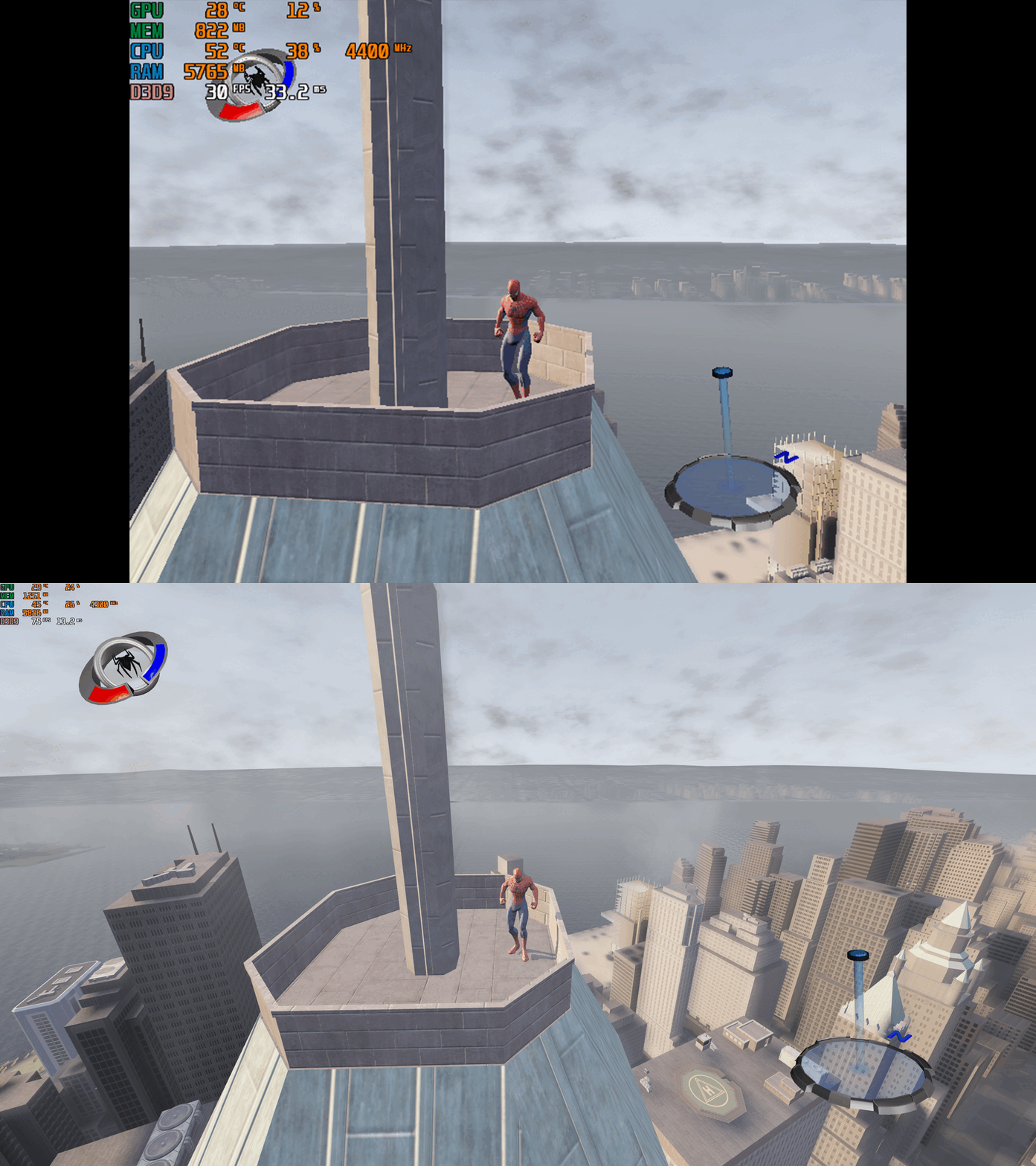
This fix adds modern PC features to Spider-Man: The Movie Game (2002) and fixes MAJOR ISSUES. Official Video Guide Requirements before using fix For the fix to work properly YOU MUST HAVE patched the game up to version 1.3, which also contains major bug fixes. If you have not done so already then you can download the patch from here - Spider-Man; The Movie Game (2002) 1.3 Patch Features included in this fix Start up crash fix for modern versions of Windows Higher Resolutions and Aspect Ratio with Aspect Ratio auto calculated by users Resolution FMV's fixed for higher resolutions and functionality on modern Windows Custom higher framerate support Higher FOV support Custom X-Input Support Windowed/Borderless Window support Custom ICO (icon file) by XanderNT How to use Download the latest Spider-Man (2002) fix (that is correct for you) of either: Spider-Man (2002) Custom Controller Support Fix (Main fix to use) Spider-Man (2002) Start Up Crash with Controller Fix (If user has start up crash MUST use this fix) Spider-Man (2002) Fix Windowed V-Sync DX8to9 Spider-Man (2002) BASIC Fix Please bare in mind that if you have the start up crash issue then you can’t use the custom controller support fix (X-Input) controller addition due to compatibility issues. In order to fix that crash problem, so YOU MUST USE the Start Up Crash with Controller Fix to be able to use the games original controller D-Input support. Once you have downloaded the correct fix for you extract the files into your games main install folder next to the SpiderMan.exe file and you are good to go! You can edit the settings you wish to use in the various ini files. Resolution/Aspect Ratio Choose the Resolution you wish to use in the d3d8.ini file by writing the Width and Height for your specific Resolution. Aspect Ratio is automatically calculated. FMVs Chip has spent lots of time fully reverse engineering the games FMVs to fix them. All fix releases now come with two folders inside 4K and 1080p this is for the FMVS fullscreen fix. To set the size of the FMVS edit the settings inside of the d3d8.ini file. The FMV fullscreen fix has been tested on 1080p, 4K resolutions. This is also tested on the Steam Deck by using the 1080p folder and setting the Resolution in d3d8.ini. The basic rule is: 1080p and any Resolution under use the 1080p fix folder Anything above 1080p Resolution use the 4K fix folder You may however need to play around with this If you don’t want intro movies to play and get straight into the game then: Go to path-to-game\movies and delete or rename the following files (make sure you back them up somewhere else) ACTIVISN.bik GrayMatr.bik Origin1.bik Treyarch.bik If you are still experiencing a crashing issue with the FMVS/Movies, then you may have to rename the folder in your games install location ‘Movies’ to a different name such as ‘Movies Broken’ so then the game plays without the FMVS/movies at all. This should however, not happen anymore and if it does its extremely uncommon. FPS The default for FPS is '60' you can change it as you wish in the dxwrapper.ini file under the option OverrideRefreshRate. It is also recommended that you leave both v-sync options on by default. FOV To choose your FOV edit it in the d3d8.ini file There are 4 different options to choose from '1', '2', '3' and '4' with each one zooming out the FOV more each time. It’s advised to not go above (2) if you do not wish to see any objects popping in and out of view in open city levels. If you don’t wish to use any FOV and stick with original, you can just set this to '0'. Controller Support (X-Input) Chip has spent some time writing a full custom dinput8.dll which provides X-Input support for the game. This will work with Xbox controllers. You can tweak right stick sensitivity in controllersupport.ini. If you don’t have an Xbox controller and use PlayStation, you can use DS4/5 or add the game to Steam as a non Steam game. If you want to use the custom controller support download the Spider-Man (2002) Custom Controller Support Fix. Custom controller support will only work for those without the crashing on start up issue, if you have the crashing on start up then you MUST USE THE Spider-Man (2002) Start Up Crash with Controller Fix. Issues/Problems If you have any issues, with the fixes then please go to discord for help linked below. Fix Enhancers Discord Server Vote to see the game return via GOG Dream list If you are interested in potentially seeing this game easily available to purchase and use today then go and vote on the games GOG Dream list to help make this become a reality, you can vote for the game here and write a message about the game if you wish – Spider-Man: The Movie Game (2002) GOG Vote Fix Enhancers Fix Enhancers Website “Creating compatibility fixes and enhancements for legacy PC games.” Credit to Elisha Riedlinger for the base wrapper, ThirteenAG and Samuel Grossman - xidi used to get controllers working in Spider-Man (2002) Start Up Crash with Controller Fix. Chip – Founder, Reverse Engineer, Programmer, Developer, Game Preservationist JokerAlex21 – Founder, Admin, Tester-
- 1
-

-
- sp2002
- spider-man
- (and 19 more)
-
Version 1.0.0
89 downloads
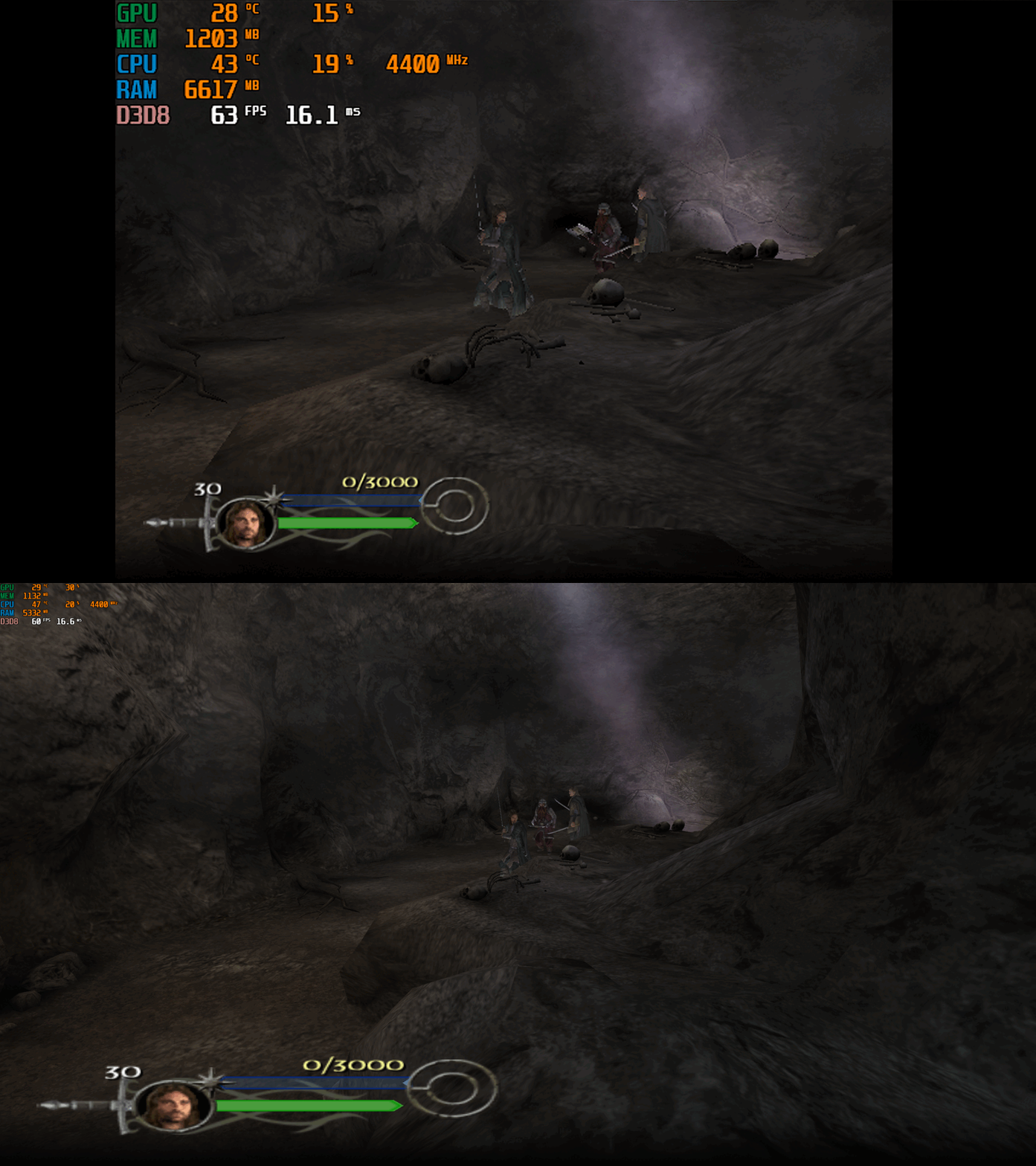
This fix adds modern PC features to The Lord of the Rings the Return of the King. Official Video Guide Requirements before using the fix YOU MUST download the amazing Nemesis2000 widescreen fix from here - Nemesis 2000 LOTRROTK Resolution/Aspect Ratio Fix Once you download the Nemesis2000 fix place the LOTRW.dll and LOTR.ini into the games install folder next to the ROTK.exe file. DO NOT PLACE THE d3d8.dll file from Nemesis2000 fix into the game install area as this is replaced by the Fix Enhancers Fix.dll file instead. The Nemesis2000 fix will cover the resolution and aspect ratio side while the Fix Enhancers fix covers everything else. Features included in this fix Higher Resolutions and Aspect Ratio support (via the Nemesis 2000 fix) Custom higher framerate support Higher FOV support Windowed/Borderless Window support How to use Download the latest The Lord of the Rings the Return of the King PC Fix file Extract it and put the Fix.dll and d3d8.ini into your game folder next to the ROTK.exe file and you are good to go! You can edit the settings you wish to use in the d3d8.ini file. Download the Nemesis 2000 Fix and extract the LOTR.ini and LOTRW.dll files into your game folder next to the ROTK.exe file. Edit the LOTR.ini file to edit the resolution you wish to use. Resolution/Aspect Ratio Open the LOTR.ini file and next to Width and Hight put your resolution for example (3840x2160). Note that once you boot up the game it will now be set to the correct resolution and aspect ratio. However, DO NOT change the resolution in the games graphics options, the resolution you put in the LOTR.ini file will not show up in the resolution list within the game which is normal. FPS The default for FPS is (60) you can change it as you wish or fully uncap it with (0) with the FPSLimit option in the d3d8.ini file. The FPS has been limited to 120fps in this fix due to game breaking bugs going above 120fps. FOV The default for FOV is (0) which is off, you can turn this on in the d3d8.ini by changing the (0) to (1). It is recommended that this is kept off by default due to FOV being quite broken in multiple areas of the game such as the level selection menu. You can use this setting, and it will work mostly fine during gameplay and will fix issues on higher resolutions where the camera goes inside the characters during cutscenes. The FOV is a work in progress and will be further looked into. Issues/Problems If you have any issues, with the fixes then please go to discord for help linked below. Fix Enhancers Discord Server Vote to see the game return via GOG Dream list If you are interested in potentially seeing this game easily available to purchase and use today then go and vote on the games GOG Dream list to help make this become a reality, you can vote for the game here and write a message about the game if you wish – The Lord of the Rings the Return of the King GOG Vote Fix Enhancers Fix Enhancers Website “Creating compatibility fixes and enhancements for legacy PC games.” Chip – Founder, Reverse Engineer, Programmer, Developer, Game Preservationist JokerAlex21 – Founder, Admin, Tester -
.thumb.png.33c3a44d193ce4d2731da43fe11c2aa8.png)
Version 1.1.0
134 downloads
This file contains some general improvements for a game called Scooter pro. Unpack it into the game directory. Features: Resolution selector is unlocked Aspect ratio is fixed The frame rate limited to 60 Field of view is fixed and possible to set a multiplier in scripts/ScooterFixer.ini The game use the WASD keys instead of the arrow keys HUD is partially fixed- 6 comments
-
- 2
-
-

-
- resolution fix
- fov fix
- (and 2 more)
-
Version 1.0.0
54 downloads
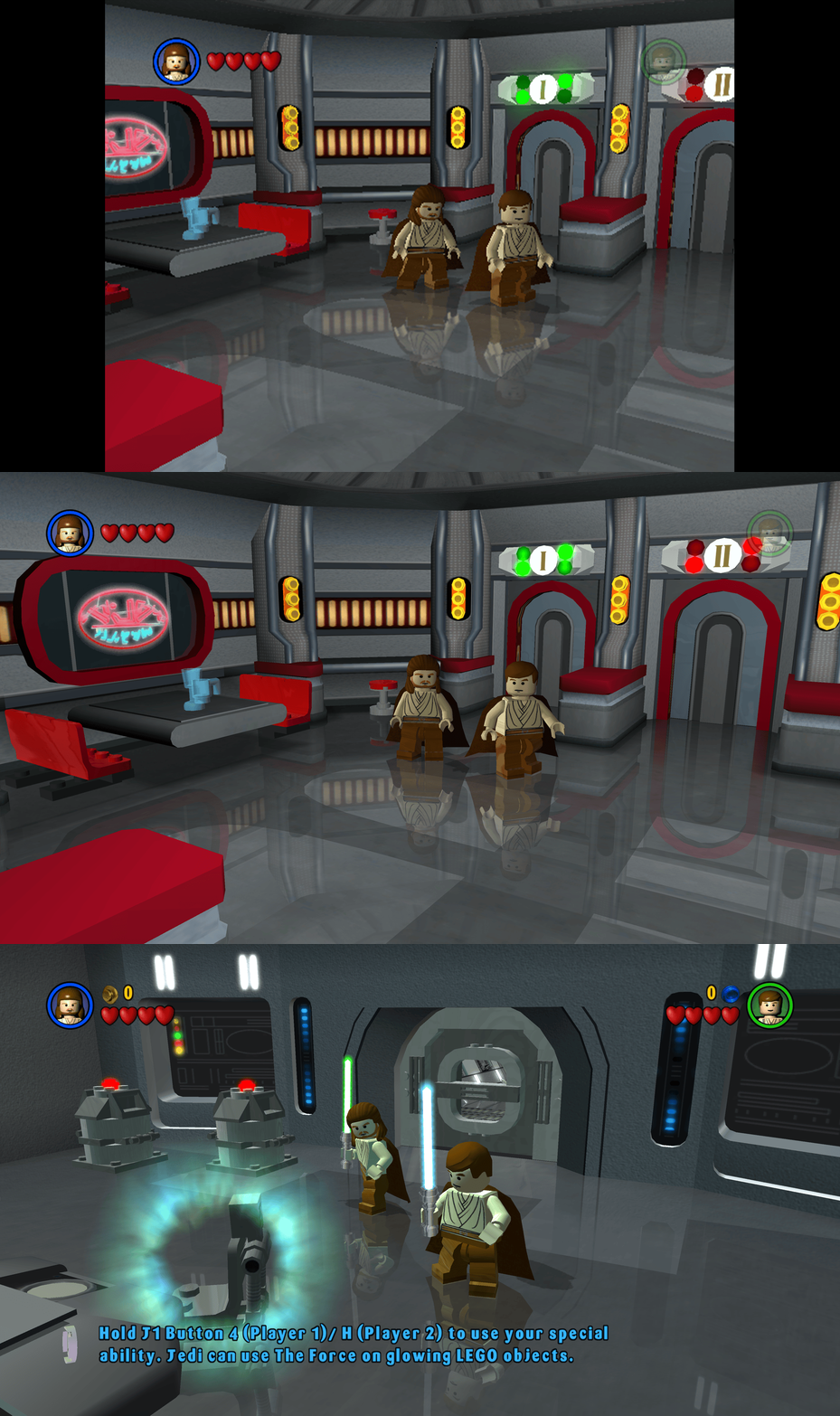
This fix adds modern PC features to Lego Star Wars (2005). Requirements before using the fix Before using the fix for it to work properly you MUST have patched the game up to 1.0.0.2 release. If you have not updated your Lego Star Wars (2005) already then you can download the patch from here - Lego Star Wars (2005) 1.0.0.2 Patch Features included in this fix Higher Resolutions and Aspect Ratio support HUD corrections for higher resolutions/aspect ratios Custom higher framerate support Developer Menu How to use Download the latest Lego Star Wars (2005) PC Fix.zip Extract the d3d9.dll, d3d9.ini, ChipDebug.ini and ChipDebugLSW.exe files into your game folder next to the LegoStarWars.exe file and you are good to go! You can edit the settings you wish to use in the d3d9.ini and ChipDebug.ini files. Resolution,Aspect Ratio and HUD Corrections The default for resolution is set to (1920 x 1080) in the d3d9.ini file. Put the resolution that you wish to use in both the Width and Height area. Aspect Ratio and HUD size is auto calculated by the Resolution you choose. FPS The default for FPS is (60) you can change it as you wish with the FPSLimit option in the d3d9.ini file. It is recommended to not go above 60. Developer Menu Put ChipDebugLSW.exe and ChipDebug.ini with d3d9.dll and d3d9.ini. Go into ChipDebug.ini and set the settings, you SHOULD pay attention to your region of your game. if you want the game to run after you run the patcher program set LAUNCH_GAME=1 if not then LAUNCH_GAME=0 the default is 0 REGION SETTINGS: Set EXACTLY ONE of the following to 1. All others must be 0. EU = Patch the EUROPE / PAL version of the game EU_RESET = Restore the ORIGINAL EU executable US = Patch the UNITED STATES / NTSC version of the game US_RESET = Restore the ORIGINAL US executable Examples: Enable EU debug: EU=1 Disable EU debug: EU_RESET=1 [REGION] Region selection (choose ONE only) EU=1 EU_RESET=0 US=0 US_RESET=0 Developer Menu becomes available in the game after patching it once enabled it is advised that you DON'T use in the main menu its a bit buggy use it once you get into the game itself by pausing and going to options. After setting up in the ini then run ChipDebugLSW.exe then you can play the game normally by using LegoStarwars.exe, if for any reason you want to turn off developer mode then just use the patcher program again. it will also give you a LegoStarwars.exe.bak incase of failures. Issues/Problems If you have any issues, with the fixes then please go to discord for help linked below. Fix Enhancers Discord Server Vote to see the game return via GOG Dream list If you are interested in potentially seeing this game easily available to purchase and use today then go and vote on the games GOG Dream list to help make this become a reality, you can vote for the game here and write a message about the game if you wish – Lego Star Wars (2005) GOG Vote Fix Enhancers Fix Enhancers Website “Creating compatibility fixes and enhancements for legacy PC games.” Chip – Founder, Reverse Engineer, Programmer, Developer, Game Preservationist JokerAlex21 – Founder, Admin, Tester -
.thumb.png.b7346f2c30addf6c9007efc0a737d19f.png)
Version 1.0.0
98 downloads
This file contains some general improvements for a game called Black & White 2 and its expansion Black & White 2 Battle of the Gods. Features: Fast startup: Skiping the intro videos completly Fix the aspect ratio of the "advisors" Scale the font sizes (scaling factor in scripts/blackfixer.ini) Include a wrapper to fix other compatiblity problems(ex.: playing with a high frequency mouse) Installation: Base game: Unpact it into the game directory Expansion: Unpack it into the "BaseGame/Black & White 2 Battle of the Gods" directory-
- 1
-
-
- aspect ratio fix
- unofficial patch
- (and 1 more)
-
Version 1.0.0
122 downloads
This file contains a widescreen fix for a game called Jurassic Park: Operation Genesis. Unpack it into the game folder. Features: Unlock the in-game resolution selector Unlock the resolution selector in Setup.exe Field of view correction and ability to set a multiplier in scripts/JurassicFixer.ini Fix the GUI and HUD aspect ratio Compensate the aspect ratio of the background video- 1 comment
-
- 1
-
-
- resolution fix
- aspect ratio fix
- (and 1 more)
-
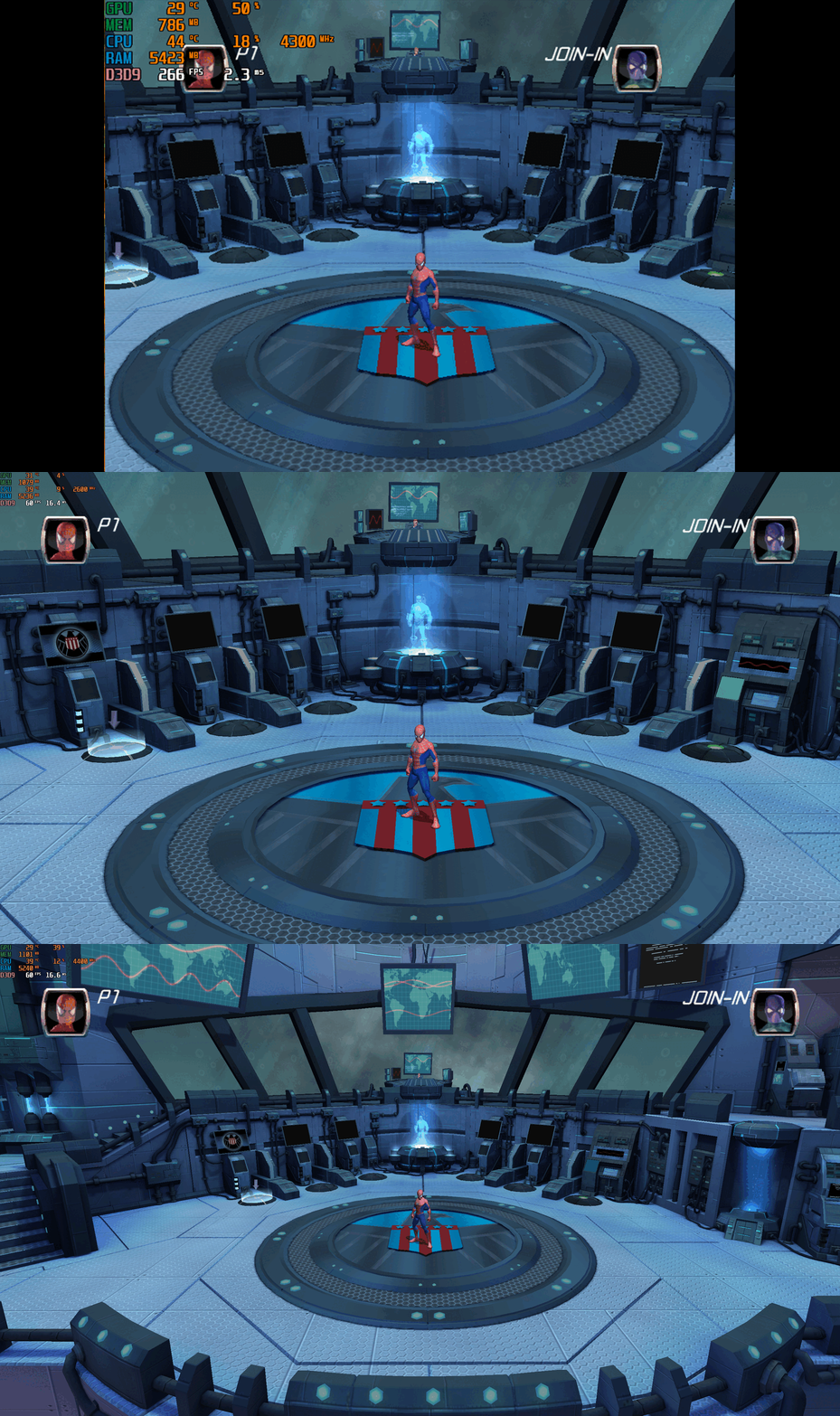
Version 1.0.0
509 downloads
Spider-Man Friend or Foe – PC Fix This fix adds modern PC features to Spider-Man Friend or Foe, including widescreen resolution support, higher aspect ratios, higher framerates and adjustable FOV. It is based on Elisha Riedlinger’s Direct3D 9 wrapper and expanded with additional enhancements and patches by Chip. Features included in this fix Widescreen and ultrawide resolution support Higher aspect ratio options Adjustable FOV values FPS unlocking Editable d3d9.ini configuration How to use Download the Spider-Man Friend or Foe fix. Extract d3d9.dll and d3d9.ini into your game folder next to game.exe. Edit d3d9.ini to configure resolution, aspect ratio, FPS and FOV. Resolution and Aspect Ratio The default Resolution is set to 1920x1080. Change the Width and Height fields to your preferred resolution. The default Aspect Ratio value is 1 (16:9). Choose a different preset by selecting the number matching your display. FPS The default FPS limit is 60. You may change this value or uncap it completely with 0 using the FPSLimit option in d3d9.ini. FOV The default FOV value is 0, which corresponds to the game’s original FOV. Increase the FOV value to zoom out the camera further. Additional notes This game benefits greatly from higher modern resolutions, aspect ratios, and FOV support. All configuration is handled through d3d9.ini. Official video guide Issues/Problems If you have any issues, with the fixes then please go to discord for help linked below. https://discord.gg/eVJ7sQH7Cc Vote to see the game return via GOG Dream list If you are interested in potentially seeing this game easily available to purchase and use today then go and vote on the games GOG Dream list to help make this become a reality, you can vote for the game here and write a message about the game if you wish – https://www.gog.com/dreamlist/game/spider-man-friend-or-foe-2007 Credits Base wrapper by Elisha Riedlinger & ThirteenAG. Additional game-specific patches, reverse engineering, enhancements, and configuration by Chip. Fix Enhancers https://fixenhancers.wixsite.com/fix-enhancers “Creating compatibility fixes and enhancements for legacy PC games.” Chip – founder, reverse engineer, programmer, developer, game preservationist JokerAlex21 – founder, admin, tester -
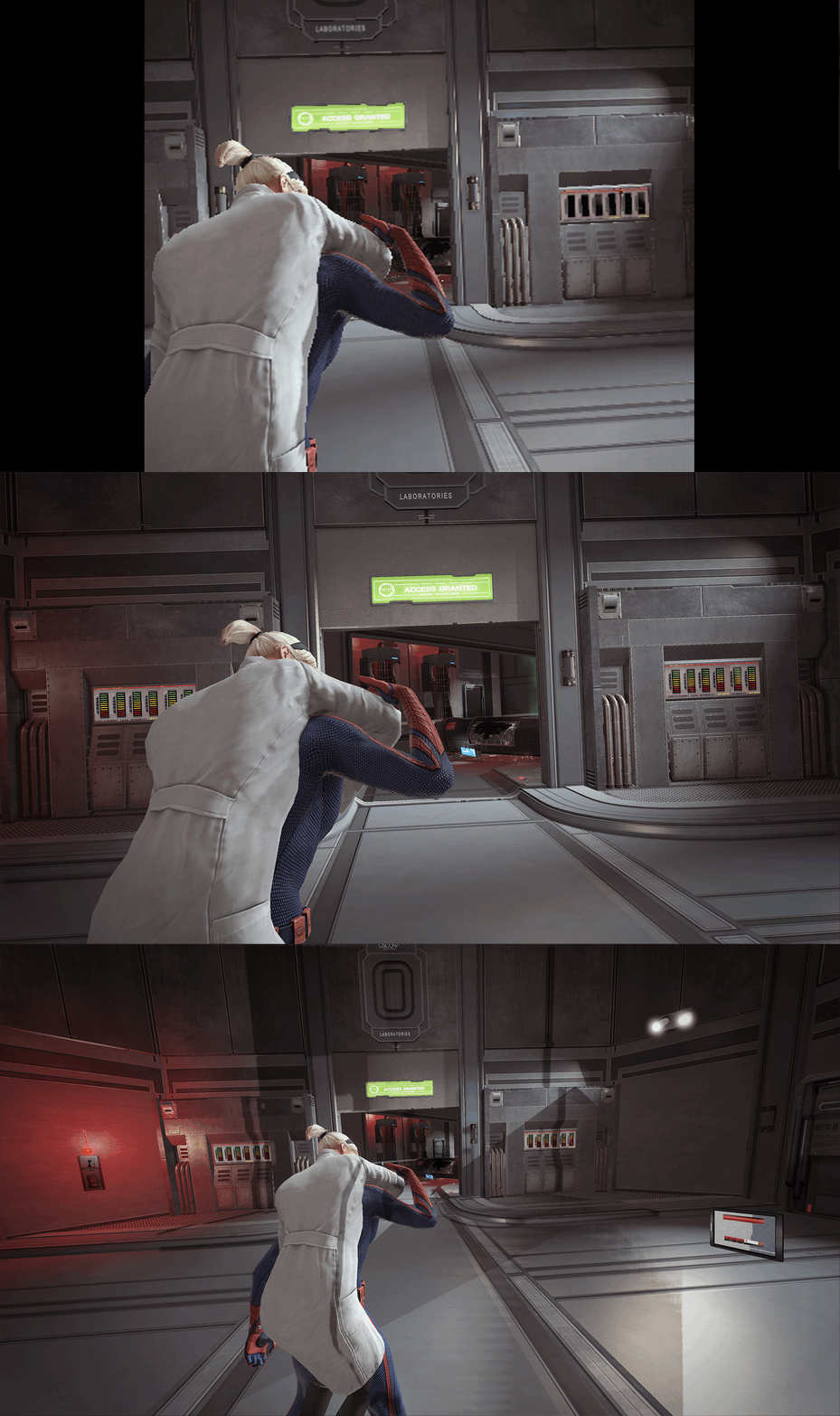
Version 1.0.0
1,421 downloads
The Amazing Spider-Man – PC Fix This fix adds modern PC features to The Amazing Spider-Man, including fixing widescreen resolutions and higher aspect ratio support, FPS smoother, broken shadows fix, higher FOV toggle and fixed VideoDetection.dll file (for Steam users) to fix the launcher not having correct memory. It is based on Elisha Riedlinger’s Direct3D 9 wrapper and expanded with additional enhancements and patches by Chip. Features included in this fix Widescreen and ultrawide resolution support Higher aspect ratio options FPS smoothing Higher FOV toggle Shadows fix STEAM USERS ONLY - Launcher memory issue fix Editable d3d9.ini configuration How to use Download the Amazing Spider-Man fix. Extract d3d9.dll, d3d9.ini and [hotkey]keycodes.txt files into your game folder next to game.exe. Edit d3d9.ini to configure resolution, aspect ratio and FPS limit and FOV Toggle options. Resolution and Aspect Ratio The default Resolution is set to 1920x1080. Change the Width and Height fields to your preferred resolution. The default Aspect Ratio value is 1 (16:9). Choose a different preset by selecting the number matching your display. FPS The fix makes frame rate as smooth as possible by tricking the game to run under an older Nvidia graphics card that it was originally running well on. The default for FPS is set to 0 which is uncapped. The FPS can only go up to 60. FOV The default FOV value is 1, which is slightly zoomed out. To set an increased FOV or use the default game FOV set the option to either 0 or 1,2,3. Issues/Problems If you have any issues, with the fixes then please go to discord for help linked below. https://discord.gg/eVJ7sQH7Cc Vote to see the game return via GOG Dream list If you are interested in potentially seeing this game easily available to purchase and use today then go and vote on the games GOG Dream list to help make this become a reality, you can vote for the game here and write a message about the game if you wish – https://www.gog.com/dreamlist/game/the-amazing-spider-man-2012 Credits Base wrapper by Elisha Riedlinger & ThirteenAG. Additional game-specific patches, reverse engineering, enhancements, and configuration by Chip. Fix Enhancers https://fixenhancers.wixsite.com/fix-enhancers “Creating compatibility fixes and enhancements for legacy PC games.” Chip – founder, reverse engineer, programmer, developer, game preservationist JokerAlex21 – founder, admin, tester -
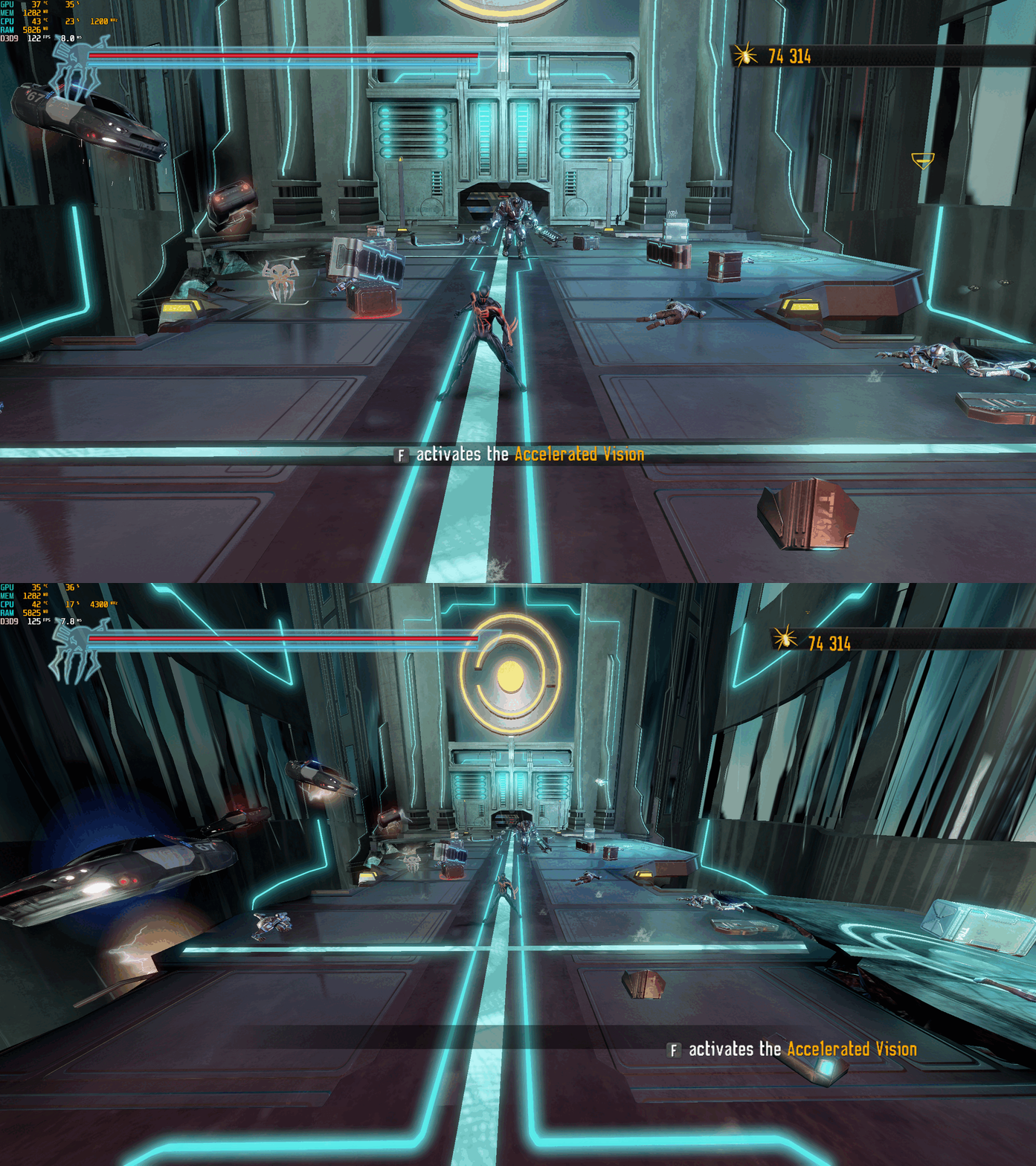
Version 1.0.0
1,232 downloads
Spider-Man: Shattered Dimensions – PC Fix This fix adds modern PC features to Spider-Man: Shattered Dimensions, including fixing widescreen resolutions which auto calculate aspect ratio, uncapped FPS and higher FOV. It is based on Elisha Riedlinger’s Direct3D 9 wrapper and expanded with additional enhancements and patches by Chip. Features included in this fix Widescreen and ultrawide resolution support which auto calculates aspect ratio Higher FOV (with toggle system for broken sections) Uncapped FPS Editable d3d9.ini configuration How to use Download the Spider-Man: Shattered Dimensions fix. Extract d3d9.dll and d3d9.ini and [hotkey]keycodes.txt files into your game folder next to game.exe. Edit d3d9.ini to configure resolution, FPS limit and FOV. To edit the FOV hotkey you wish to use for the toggle find the keycode from inside the [hotkey]keycodes.txt file and then paste this into the corresponding area inside of the d3d9.ini file for the hotkey option. Resolution and Aspect Ratio The default Resolution is set to 1920x1080. Change the Width and Height fields to your preferred resolution. Aspect Ratio is auto calculated by the set resolution. FPS The default FPS limit is 60. You may change this value or uncap it completely with 0 using the FPSLimit option in d3d9.ini. Bare in mind it is advised you do not go above 60 as bugs can occur at higher FPS. FOV The default FOV value is 2, which is fully zoomed out. To set a lower FOV or use the default game FOV set the option to either 0 or 1. Issues/Problems If you have any issues, with the fixes then please go to discord for help linked below. https://discord.gg/eVJ7sQH7Cc Vote to see the game return via GOG Dream list If you are interested in potentially seeing this game easily available to purchase and use today then go and vote on the games GOG Dream list to help make this become a reality, you can vote for the game here and write a message about the game if you wish – https://www.gog.com/dreamlist/game/spider-man-shattered-dimensions Credits Base wrapper by Elisha Riedlinger & ThirteenAG. Additional game-specific patches, reverse engineering, enhancements, and configuration by Chip. Fix Enhancers https://fixenhancers.wixsite.com/fix-enhancers “Creating compatibility fixes and enhancements for legacy PC games.” Chip – founder, reverse engineer, programmer, developer, game preservationist JokerAlex21 – founder, admin, tester -
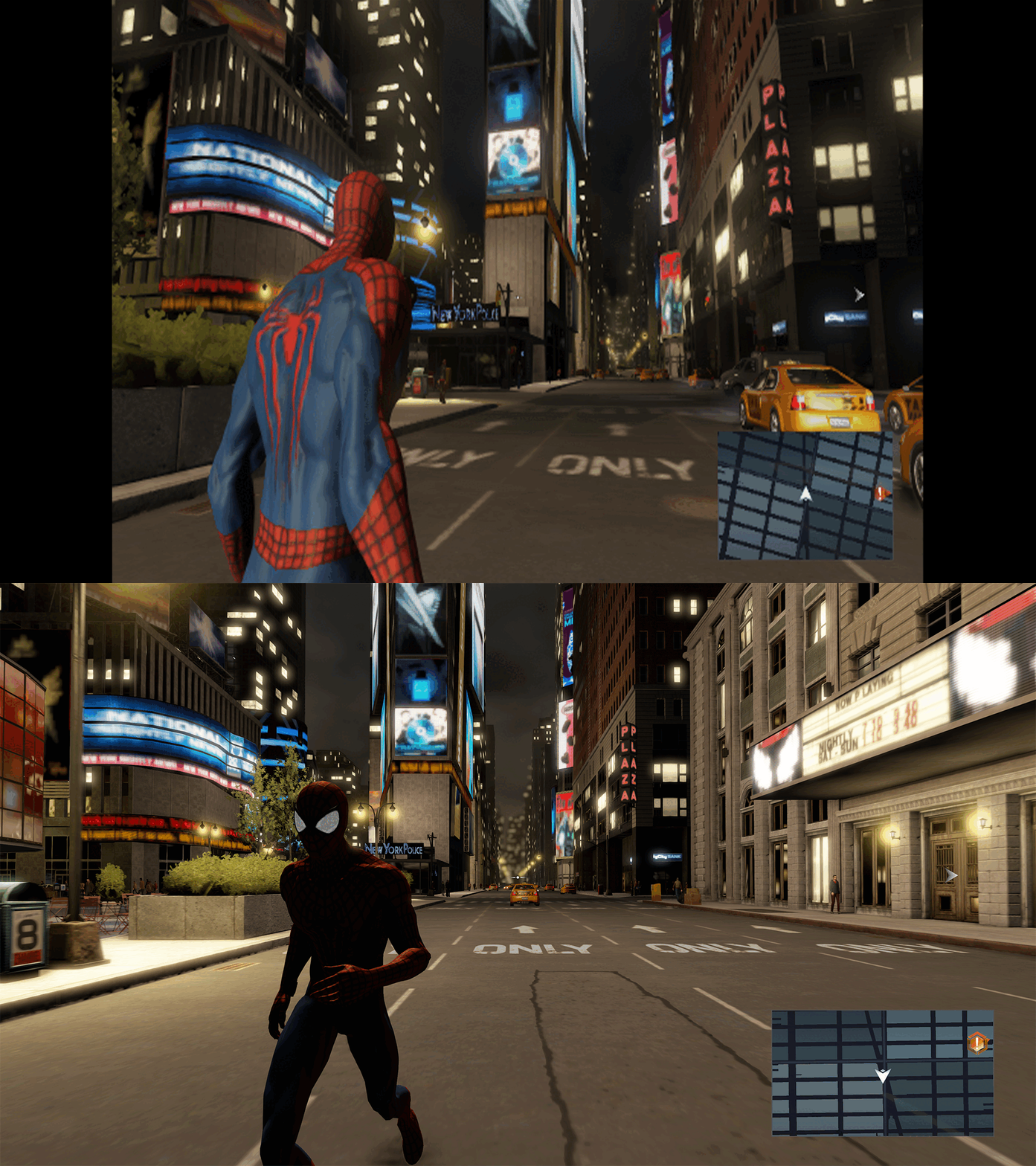
Version 1.0.0
1,065 downloads
The Amazing Spider-Man 2 – PC Fix This fix adds modern PC features to The Amazing Spider-Man 2, including fixing widescreen resolutions and higher aspect ratio support, FPS smoother and Turning off the 30fps v-sync cap. It is based on Elisha Riedlinger’s Direct3D 9 wrapper and expanded with additional enhancements and patches by Chip. Features included in this fix Widescreen and ultrawide resolution support Higher aspect ratio options FPS smoothing/v-sync fix Editable d3d9.ini configuration How to use Download the Amazing Spider-Man 2 fix. Extract d3d9.dll and d3d9.ini into your game folder next to game.exe. Edit d3d9.ini to configure resolution, aspect ratio and FPS limit. Resolution and Aspect Ratio The default Resolution is set to 1920x1080. Change the Width and Height fields to your preferred resolution. The default Aspect Ratio value is 1 (16:9). Choose a different preset by selecting the number matching your display. FPS The fix makes frame rate as smooth as possible by tricking the game to run under an older Nvidia graphics card that it was originally running well on. The default for FPS is set to 0 which is uncapped. The FPS can only go up to 60. Issues/Problems If you have any issues, with the fixes then please go to discord for help linked below. https://discord.gg/eVJ7sQH7Cc Vote to see the game return via GOG Dream list If you are interested in potentially seeing this game easily available to purchase and use today then go and vote on the games GOG Dream list to help make this become a reality, you can vote for the game here and write a message about the game if you wish – https://www.gog.com/dreamlist/game/the-amazing-spider-man-2-2014 Credits Base wrapper by Elisha Riedlinger & ThirteenAG. Additional game-specific patches, reverse engineering, enhancements, and configuration by Chip. Fix Enhancers https://fixenhancers.wixsite.com/fix-enhancers “Creating compatibility fixes and enhancements for legacy PC games.” Chip – founder, reverse engineer, programmer, developer, game preservationist JokerAlex21 – founder, admin, tester -
Version 1.0.0
1,113 downloads
Spider-Man 3 – PC Fix This fix adds modern PC features to Spider-Man 3, including widescreen resolution support, higher aspect ratios, higher framerates (with a toggle system for broken areas) and adjustable FOV. It is based on Elisha Riedlinger’s Direct3D 9 wrapper and expanded with additional enhancements and patches by Chip. Features included in this fix Widescreen and ultrawide resolution support Higher aspect ratio options Adjustable FOV values FPS unlocking (with 30fps toggle for broken areas) Editable d3d9.ini configuration How to use Download the Spider-Man 3 PC Fix. Extract the contents d3d9.dll, d3d9.ini and [hotkey]keycodes.txt files into the installation folder next to game.exe. You can edit the settings you want in the d3d9.ini file. To edit the FPS hotkey you wish to use for the toggle find the keycode from inside the [hotkey]keycodes.txt file and then paste this into the corresponding area inside of the d3d9.ini file for the hotkey option. Resolution and Aspect Ratio The default Resolution is set to 1920x1080. Change the Width and Height fields to your preferred resolution. The default Aspect Ratio value is 1 (16:9). Choose a different preset by selecting the number matching your display. FPS The default FPS limit is 60. You may change this value or uncap it completely with 0 using the FPSLimit option in d3d9.ini. FOV The default FOV value is 0, which corresponds to the game’s original FOV. Increase the FOV value to zoom out the camera further. Issues/Problems If you have any issues, with the fixes then please go to discord for help linked below. https://discord.gg/eVJ7sQH7Cc Vote to see the game return via GOG Dream list If you are interested in potentially seeing this game easily available to purchase and use today then go and vote on the games GOG Dream list to help make this become a reality, you can vote for the game here and write a message about the game if you wish – https://www.gog.com/dreamlist/game/spider-man-3-2007 Credits Base wrapper by Elisha Riedlinger & ThirteenAG. Additional game-specific patches, reverse engineering, enhancements, and configuration by Chip. Fix Enhancers https://fixenhancers.wixsite.com/fix-enhancers “Creating compatibility fixes and enhancements for legacy PC games.” Chip – founder, reverse engineer, programmer, developer, game preservationist JokerAlex21 – founder, admin, tester
Fix.thumb.gif.d8bbddc2c30a540510d0e41e81f88a52.gif)


.thumb.png.33c3a44d193ce4d2731da43fe11c2aa8.png)

.thumb.png.b7346f2c30addf6c9007efc0a737d19f.png)
