
Search the Community
Showing results for tags 'uw mod'.
Found 2 results
-
Version 1.1.6
1,008 downloads
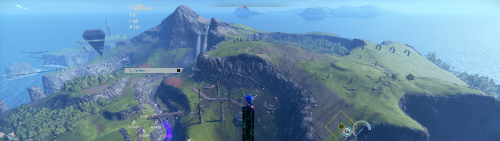
Disclaimer This software is a modification for the game Sonic Frontiers and is not affiliated with or endorsed by the Game developers or publishers. Description: Adds support for all ultra-wide resolutions HUD, FMV's are scaled to 16/9 pillarbox -> no stretching Corrections: Aspect ratio for cutscenes Target system matrix Camera sway for triple monitor, where sonic would be too far left or right in 2d sections Overlays Vignette is expanded to the ar -> no longer visible Jukebox Tested with the following aspect ratios: 16:10 21:9 32:9 48:9 How to install Windows: Extract the zip file to the game's installation directory. Start the game. Steam Deck/Linux: Extract the zip file to the game's installation directory. Open the game properties in Steam (Right-click game -> Properties). Under General -> Launch Options, paste exactly this command: WINEDLLOVERRIDES="winmm=n,b" %command% Start the game. Additionally: If you are downloading this mod for the first time, an Ultrawideconfig.ini with your system specs will be automatically created upon launch. Check the .ini file to ensure width and height match your resolution. You can also change FPS or 16:10 HUD scaling here. Don't forget to save. Check in-game that your resolution is correct. You can adjust the FOV in-game. It's called Camera Angle and Distance. Note: If you have used other mods before, make sure they don't conflict (e.g., mods changing aspect ratio or vignettes). If something isn't working, feel free to leave a comment here or in the WSGF Discord. Overlay & Configuration You can use the mods overlay to fine-tune the camera for 2D sections and rain effects. Toggle overlay with F9 Mouse wheel can be used for fine-tuning values. Once satisfied, click "Save Config". Settings are applied automatically on the next startup. Gamepad controls are passed through to the game even while the overlay is open. Note: The overlay is only compatible with Borderless or Windowed mode. How to uninstall Delete the mod files from the game directory. Support my work Developing complex logic and maintaining updates takes a lot of time and coffee. If this mod improved your game experience, consider buying me a coffee! It helps me keep going and working on fixes for future games. Paypal Ko-fi Credits ThirteenAG - Ultimate-ASI-Loader -
Version 1.0.5
2,177 downloads
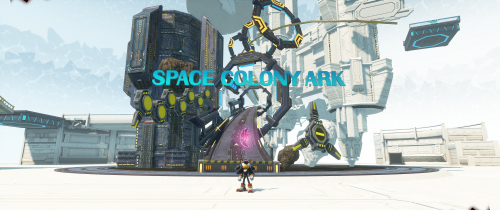
Disclaimer This software is a modification for the game Sonic X Shadow Generations and is not affiliated with or endorsed by the Game developers or publishers. Description: Adds support for all ultra-wide resolutions HUD, FMV's are scaled to 16/9 pillarbox -> no stretching Corrections: Classic Generations: removing black bars hud scaling + centering removing the unnecessary text and overlay at level start fmvs Shadow: scaling for hud + overlays + fmvs + cutscenes expanding the vignettes like chaos control scaling error of Shadow when selecting act targeting system Correctly positioning the camera for triple monitor setup in 2D section Tested with the following aspect ratios: 16:10 21:9 32:9 48:9 How to install This ASI file works with both games by their original executable file name. Make sure it's present in the original: SONIC_GENERATIONS.exe SONIC_X_SHADOW_GENERATIONS.exe Extract the zip file to the game's installation directory. If you download this mod first time a Ultrawideconfig.ini with your specs will be created. Make sure that your width and height in the ini file is right. There is also a option for 16:10 Hud Scaling. Don't forget to save. If you've used other mods before, make sure they don't conflict or have something to do with aspect ratio or vignette. Check in-game that your resolution is correct. You can use the overlay to fine-tune the camera for the 2D sections and the rain in Shadow Gens. The mouse wheel can also be used for fine-tuning. Once you're satisfied with your configuration, you can save it. The saved settings will then be applied directly every time you start the game. Gamepad controls will still be passed through to the game. Only compatible with borderless and window mode. Toggle the overlay with "F9". The UI Fix will not be fully active at the start of a new game in Classic, during the first level with Classic Sonic (before the first FMV), because the values only become available afterwards. For Steam Deck/Linux you need to add WINEDLLOVERRIDES="winmm=n,b" %command% to the Steam launch options for the game. If something isn't working, feel free to leave a comment here or in the WSGF Discord. How to uninstall Delete all files from the directory. If you enjoy my work and want to support future improvements or new projects, you can do so here: Paypal Ko-fi Even small contributions mean a lot, thank you! Credits ThirteenAG - Ultimate-ASI-Loader

