
Search the Community
Showing results for tags 'improvement'.
Found 7 results
-
Version 1.0.0
430 downloads
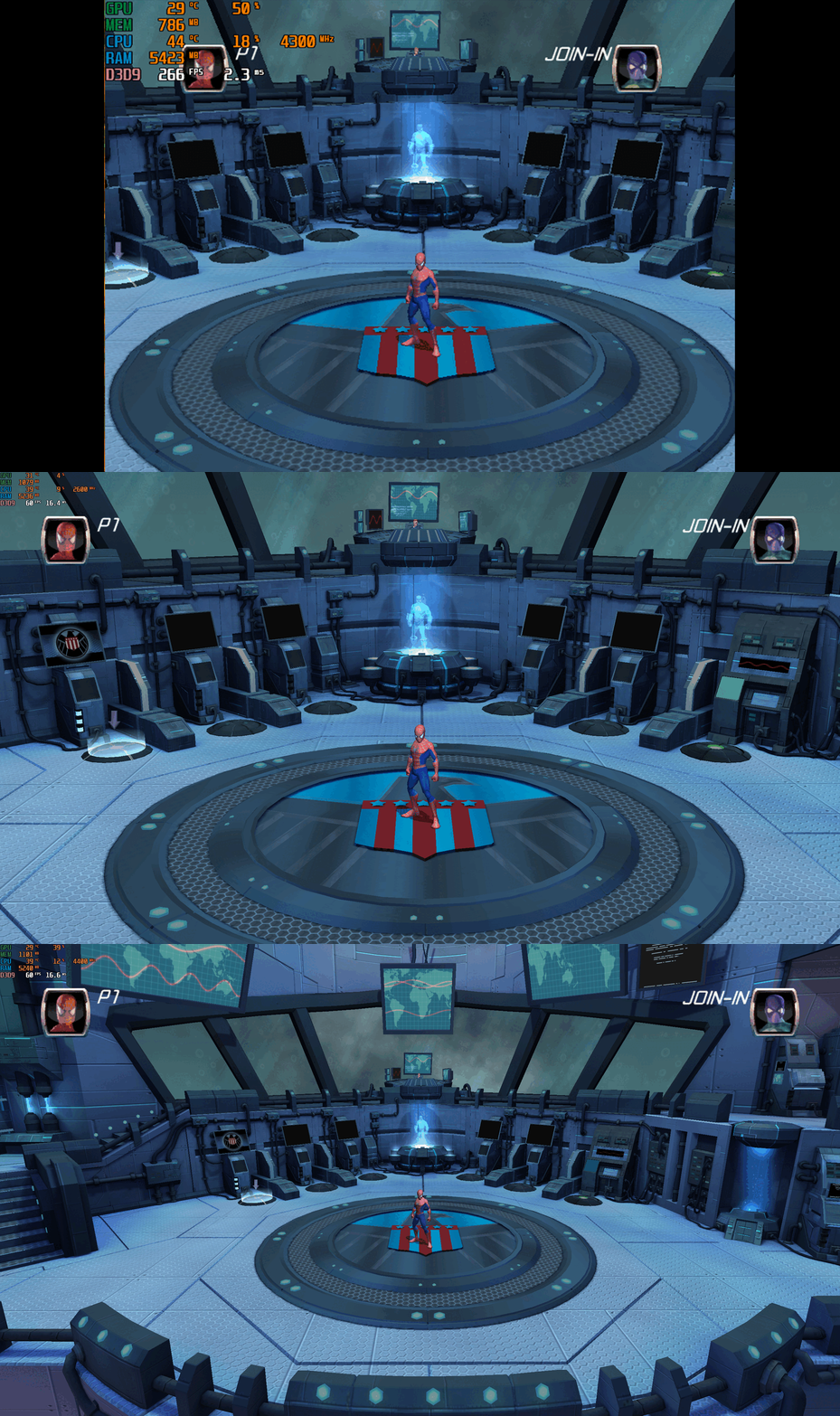
Spider-Man Friend or Foe – PC Fix This fix adds modern PC features to Spider-Man Friend or Foe, including widescreen resolution support, higher aspect ratios, higher framerates and adjustable FOV. It is based on Elisha Riedlinger’s Direct3D 9 wrapper and expanded with additional enhancements and patches by Chip. Features included in this fix Widescreen and ultrawide resolution support Higher aspect ratio options Adjustable FOV values FPS unlocking Editable d3d9.ini configuration How to use Download the Spider-Man Friend or Foe fix. Extract d3d9.dll and d3d9.ini into your game folder next to game.exe. Edit d3d9.ini to configure resolution, aspect ratio, FPS and FOV. Resolution and Aspect Ratio The default Resolution is set to 1920x1080. Change the Width and Height fields to your preferred resolution. The default Aspect Ratio value is 1 (16:9). Choose a different preset by selecting the number matching your display. FPS The default FPS limit is 60. You may change this value or uncap it completely with 0 using the FPSLimit option in d3d9.ini. FOV The default FOV value is 0, which corresponds to the game’s original FOV. Increase the FOV value to zoom out the camera further. Additional notes This game benefits greatly from higher modern resolutions, aspect ratios, and FOV support. All configuration is handled through d3d9.ini. Official video guide Issues/Problems If you have any issues, with the fixes then please go to discord for help linked below. https://discord.gg/eVJ7sQH7Cc Vote to see the game return via GOG Dream list If you are interested in potentially seeing this game easily available to purchase and use today then go and vote on the games GOG Dream list to help make this become a reality, you can vote for the game here and write a message about the game if you wish – https://www.gog.com/dreamlist/game/spider-man-friend-or-foe-2007 Credits Base wrapper by Elisha Riedlinger & ThirteenAG. Additional game-specific patches, reverse engineering, enhancements, and configuration by Chip. Fix Enhancers https://fixenhancers.wixsite.com/fix-enhancers “Creating compatibility fixes and enhancements for legacy PC games.” Chip – founder, reverse engineer, programmer, developer, game preservationist JokerAlex21 – founder, admin, tester -
Version 1.0.0
998 downloads
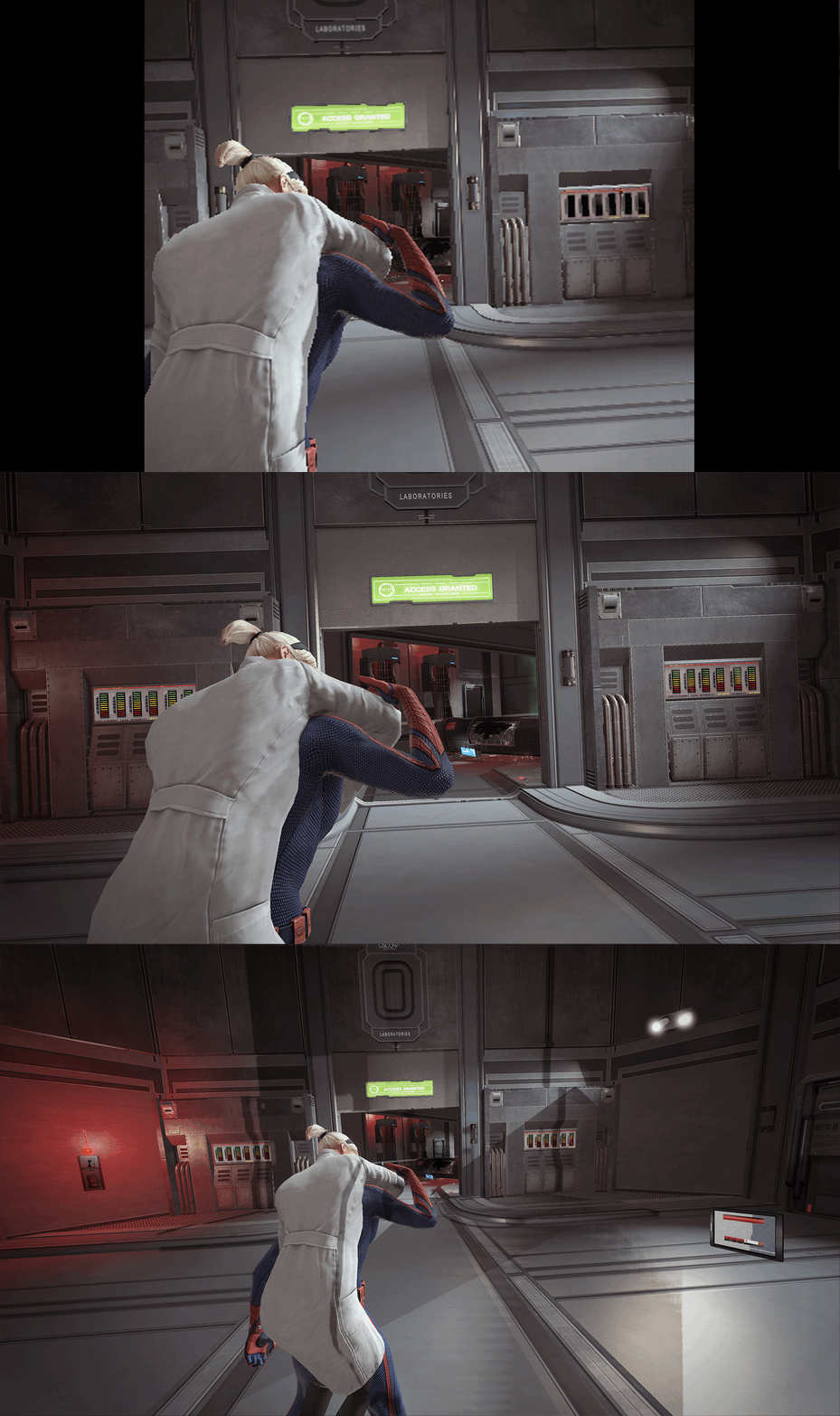
The Amazing Spider-Man – PC Fix This fix adds modern PC features to The Amazing Spider-Man, including fixing widescreen resolutions and higher aspect ratio support, FPS smoother, broken shadows fix, higher FOV toggle and fixed VideoDetection.dll file (for Steam users) to fix the launcher not having correct memory. It is based on Elisha Riedlinger’s Direct3D 9 wrapper and expanded with additional enhancements and patches by Chip. Features included in this fix Widescreen and ultrawide resolution support Higher aspect ratio options FPS smoothing Higher FOV toggle Shadows fix STEAM USERS ONLY - Launcher memory issue fix Editable d3d9.ini configuration How to use Download the Amazing Spider-Man fix. Extract d3d9.dll, d3d9.ini and [hotkey]keycodes.txt files into your game folder next to game.exe. Edit d3d9.ini to configure resolution, aspect ratio and FPS limit and FOV Toggle options. Resolution and Aspect Ratio The default Resolution is set to 1920x1080. Change the Width and Height fields to your preferred resolution. The default Aspect Ratio value is 1 (16:9). Choose a different preset by selecting the number matching your display. FPS The fix makes frame rate as smooth as possible by tricking the game to run under an older Nvidia graphics card that it was originally running well on. The default for FPS is set to 0 which is uncapped. The FPS can only go up to 60. FOV The default FOV value is 1, which is slightly zoomed out. To set an increased FOV or use the default game FOV set the option to either 0 or 1,2,3. Issues/Problems If you have any issues, with the fixes then please go to discord for help linked below. https://discord.gg/eVJ7sQH7Cc Vote to see the game return via GOG Dream list If you are interested in potentially seeing this game easily available to purchase and use today then go and vote on the games GOG Dream list to help make this become a reality, you can vote for the game here and write a message about the game if you wish – https://www.gog.com/dreamlist/game/the-amazing-spider-man-2012 Credits Base wrapper by Elisha Riedlinger & ThirteenAG. Additional game-specific patches, reverse engineering, enhancements, and configuration by Chip. Fix Enhancers https://fixenhancers.wixsite.com/fix-enhancers “Creating compatibility fixes and enhancements for legacy PC games.” Chip – founder, reverse engineer, programmer, developer, game preservationist JokerAlex21 – founder, admin, tester -

Version 1.0.0
831 downloads
Harry Potter and the Prisoner of Azkaban – PC FPS Fix with Custom Controller Support This fix adds a stable 60 FPS or 120 FPS cap to Harry Potter and the Prisoner of Azkaban using the game’s internal logic. Running the game uncapped causes major timing issues such as the frozen Imp glitch. This release also includes full custom X-Input controller support using Chip’s X-Input backend, allowing the entire game to be played with a modern controller. Features included in this fix 60 FPS or 120 FPS launchers Prevents high-FPS game bugs (including the frozen Imp glitch) Full X-Input controller support Analogue walking and running Fully editable control layout through d3d8.ini Standalone launchers; no game files are overwritten How to use (FPS launchers) Download the fix and extract the folder then go into HP3-FPS-Cap-Game-Launchers. Choose either HP3-60FPSLauncher.exe or HP3-120FPSLauncher.exe. Extract the launcher you want into the game’s system folder next to hppoa.exe. Run the chosen launcher one time. If the launcher does not start the game, try running it as administrator. You can then continue to play the game normally using hppoa.exe. How to use (Custom controller support) Download the fix and extract the folder then go into HP3-Custom-Controller. The controller layout is provided by default as in the images above. Extract d3d8.dll and d3d8.ini into the game’s install folder, usually: C:\Program Files (x86)\EA Games\Harry Potter and the Prisoner of Azkaban(TM)\system The game must load through hppoa.exe in this folder. Walking and running are analogue using the left stick. All controls can be customised inside d3d8.ini, with clear explanations in the file. If you experience double input Go to: C:\Users\YOUR_NAME\Documents\Harry Potter and the Prisoner of Azkaban Open hppoa.ini Set UseJoystick=True to UseJoystick=False This disables the game’s built-in controller detection to prevent conflicts with X-Input. Vote to see the game return via GOG Dream list If you are interested in potentially seeing this game easily available to purchase and use today then go and vote on the games GOG Dream list to help make this become a reality, you can vote for the game here and write a message about the game if you wish – https://www.gog.com/dreamlist/game/harry-potter-and-the-prisoner-of-azkaban-2004 Issues/Problems If you have any issues with the fixes then please go to the Discord for help: https://discord.gg/eVJ7sQH7Cc Credits Base wrapper by Elisha Riedlinger & ThirteenAG. Additional game-specific patches, controller support, reverse engineering, enhancements, and configuration by Chip. Fix Enhancers https://fixenhancers.wixsite.com/fix-enhancers “Creating compatibility fixes and enhancements for legacy PC games.” Chip – founder, reverse engineer, programmer, developer, game preservationist JokerAlex21 – founder, admin, tester -
Version 1.0.0
131 downloads
Star Wars: Episode I – Battle for Naboo – 64-bit Installer With Optional Modern Game Fixes This is a complete, preservation-grade 64-bit replacement installer for the original 1999 PC release, rebuilt from scratch for modern versions of Windows. This is the definitive way to install and play Star Wars: Episode I – Battle for Naboo on modern hardware, with full widescreen support, DX9 translation, stability fixes (all optional), and resolution unlocking. The original retail PC release uses a 16-bit Windows installer, which will not run on any 64-bit version of Windows. This makes the game effectively un-installable on modern systems. To preserve the game, the installer was fully rebuilt into a native 64-bit modern version that works on all current Windows versions, requires the original retail disc, recreates the full install logic, and optionally applies modern fixes and enhancements. Features included in this fix Full 64-bit replacement installer Requires the original retail disc Recreates full install logic Widescreen and modern resolution unlock DX7 to DX9 translation Thruster fix for >60Hz ASI Loader support Folder permission repair ChipResolution custom resolution support How to use Download Fix. Mount your original game disc. Launch the installer and browse to the root of the disc (e.g. D:). Follow the on-screen prompts. A desktop shortcut will be created automatically. Requirements You must own the original English retail PC CD. No game files are distributed. Mount the disc before running the installer. Common mount locations: D:\ E:\ F:\ Modern Fix Pack (Optional) In the installer you can uncheck the option for the fixes and install only the base game. ElishaCloud’s DXWrapper (D3D7 → D3D9) Adds anti-aliasing, anisotropic filtering, DX7 to DX9 translation, optional window mode through dxwrapper.ini, and a fix for the thruster bug. ThirteenAG’s Ultimate ASI Loader Automatically loads all included .asi plugins. UCyborg’s Legacy D3D Resolution Hack Unlocks modern GPU resolutions including 1080p, 1440p, ultrawide, and full 4K. Full Folder Permission Repair Automatically removes read-only attributes, fixes NTFS permissions, allows editing INI files, and prevents write errors. ChipResolution – Custom Resolution Support Allows entering resolutions directly, such as: 1920x1080 Suggestion It seems that the game does not like to go past 1920 x 1080 so just leave the configuration files as they are set up for you. If you change any settings it is done so at your own risk. Controller Support Works automatically with no additional configuration needed. The game includes native controller functionality. Rebind controls inside the game’s options menu. Issues/Problems If you have any issues with the fixes then please go to the Discord for help: https://discord.gg/eVJ7sQH7Cc Vote to see the game return via GOG Dream list If you are interested in potentially seeing this game easily available to purchase and use today then go and vote on the games GOG Dream list to help make this become a reality, you can vote for the game here and write a message about the game if you wish – https://www.gog.com/dreamlist/game/star-wars-episode-i-battle-for-naboo Credits Elisha Riedlinger — DXWrapper UCyborg — Legacy D3D Resolution Hack ThirteenAG — Ultimate ASI Loader Chip — Creating 64 bit installer, reverse engineering 16 bit installer, registry patching, modern fix integration, resolution override tool Fix Enhancers https://fixenhancers.wixsite.com/fix-enhancers “Creating compatibility fixes and enhancements for legacy PC games.” Chip – founder, reverse engineer, programmer, developer, Game Preservationist JokerAlex21 – founder, admin, tester -
Version 1.0.0
759 downloads
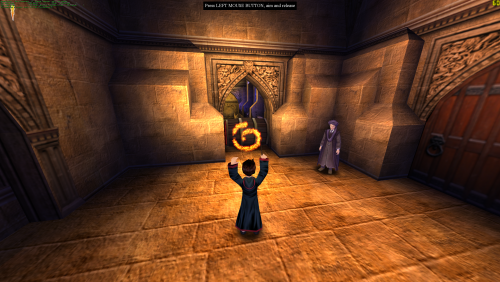
Harry Potter and the Philosopher’s Stone / Sorcerer’s Stone – PC FPS Fix This fix applies a stable 60 FPS cap to Harry Potter and the Philosopher’s Stone / Sorcerer’s Stone using the game’s internal timing logic. The engine does not have a proper way to limit framerate, and running uncapped can break physics, animations, and scripted events. This launcher forces a safe, stable framerate so the game behaves correctly. Features included in this fix Stable 60 FPS cap using internal engine logic Standalone launcher; no game files are modified Prevents high-FPS bugs, physics issues, and animation timing errors How to use Download the fix. Extract hp1-60FPSLauncher.exe into the game’s “system” folder next to hp.exe. Launch the game using hp1-60FPSLauncher.exe instead of hp.exe one time. You can now proceed to play the game normally using the games original hp.exe. Additional notes Running the game above 60 FPS causes timing issues; the launcher prevents this by using the games internal FPS logic and capping it. Issues/Problems If you have any issues, with the fixes then please go to discord for help linked below. https://discord.gg/eVJ7sQH7Cc Vote to see the game return via GOG Dream list If you are interested in potentially seeing this game easily available to purchase and use today then go and vote on the games GOG Dream list to help make this become a reality, you can vote for the game here and write a message about the game if you wish – https://www.gog.com/dreamlist/game/harry-potter-and-the-sorcerer-s-stone Credits Chip for creating the patcher program. Fix Enhancers https://fixenhancers.wixsite.com/fix-enhancers “Creating compatibility fixes and enhancements for legacy PC games.” Chip – founder, reverse engineer, programmer, developer, game preservationist JokerAlex21 – founder, admin, tester -
Version 1.0.0
820 downloads
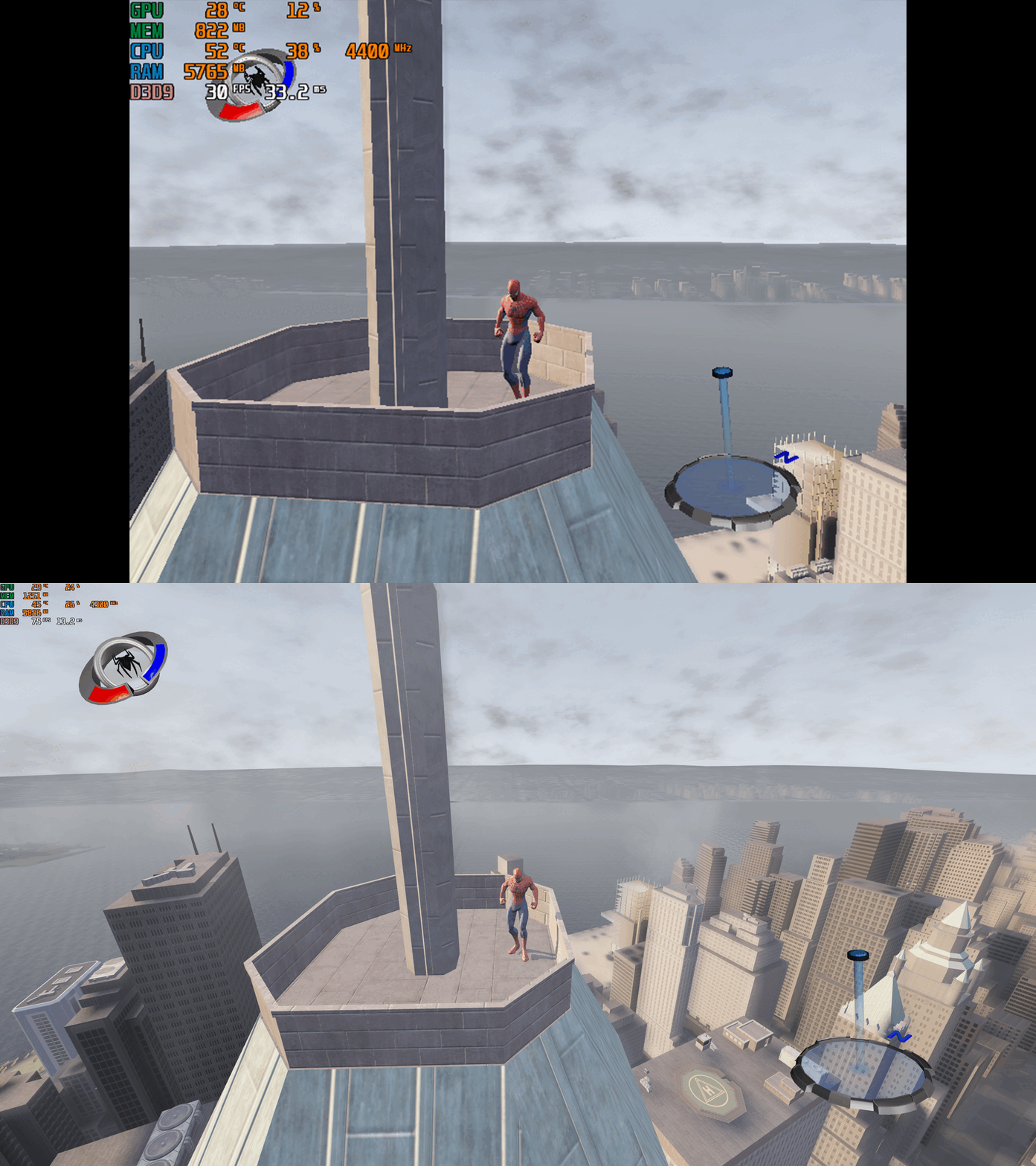
Spider-Man 3 – PC Fix This fix adds modern PC features to Spider-Man 3, including widescreen resolution support, higher aspect ratios, higher framerates (with a toggle system for broken areas) and adjustable FOV. It is based on Elisha Riedlinger’s Direct3D 9 wrapper and expanded with additional enhancements and patches by Chip. Features included in this fix Widescreen and ultrawide resolution support Higher aspect ratio options Adjustable FOV values FPS unlocking (with 30fps toggle for broken areas) Editable d3d9.ini configuration How to use Download the Spider-Man 3 PC Fix. Extract the contents d3d9.dll, d3d9.ini and [hotkey]keycodes.txt files into the installation folder next to game.exe. You can edit the settings you want in the d3d9.ini file. To edit the FPS hotkey you wish to use for the toggle find the keycode from inside the [hotkey]keycodes.txt file and then paste this into the corresponding area inside of the d3d9.ini file for the hotkey option. Resolution and Aspect Ratio The default Resolution is set to 1920x1080. Change the Width and Height fields to your preferred resolution. The default Aspect Ratio value is 1 (16:9). Choose a different preset by selecting the number matching your display. FPS The default FPS limit is 60. You may change this value or uncap it completely with 0 using the FPSLimit option in d3d9.ini. FOV The default FOV value is 0, which corresponds to the game’s original FOV. Increase the FOV value to zoom out the camera further. Issues/Problems If you have any issues, with the fixes then please go to discord for help linked below. https://discord.gg/eVJ7sQH7Cc Vote to see the game return via GOG Dream list If you are interested in potentially seeing this game easily available to purchase and use today then go and vote on the games GOG Dream list to help make this become a reality, you can vote for the game here and write a message about the game if you wish – https://www.gog.com/dreamlist/game/spider-man-3-2007 Credits Base wrapper by Elisha Riedlinger & ThirteenAG. Additional game-specific patches, reverse engineering, enhancements, and configuration by Chip. Fix Enhancers https://fixenhancers.wixsite.com/fix-enhancers “Creating compatibility fixes and enhancements for legacy PC games.” Chip – founder, reverse engineer, programmer, developer, game preservationist JokerAlex21 – founder, admin, tester -
