Search the Community
Showing results for tags '007 quantum of solace'.
Found 1 result
-

Version 1.0.0
3,259 downloads
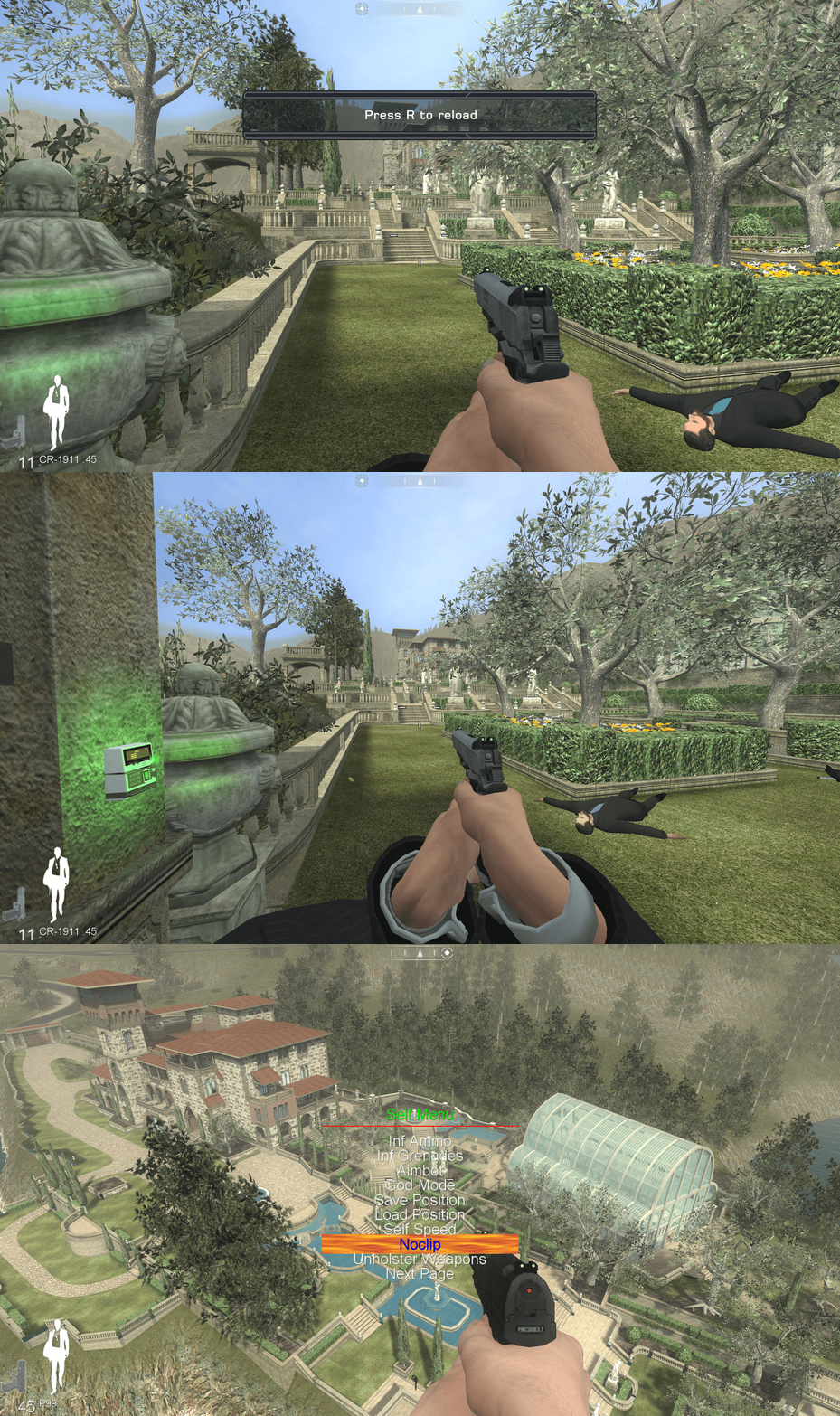
Important Information This fix is made for the Singleplayer portion of the game, if you need a Multiplayer fix then please see the Plutonium client for their fix - Plutonium Multiplayer Fix This fix adds modern PC features to James Bond Quantum of Solace Fix Features included in this fix Custom higher framerate support Custom higher FOV support X-Input Controller Support Mod Menu How to use Download the James Bond Quantum of Solace fix. Depending on the fix chosen of either 'JamesBondQOSFix' or 'JamesBondQOSFixASI' extract the contents of the folder into your games install folder next to the JB_Launcher_s.exe. If using the 'JamesBondQOSFix' edit the d3d9.ini to configure the options. If using the 'JamesBondQOSFixASI' open the Scripts folder and edit Chip.ini to configure the options. Play the game. It is advised that if using the mod menu and you have played the game before to make a backup of your save file. FPS Default for FPS is 120 which you can change in the d3d9.ini or chip.ini file. The user can use the FPS toggle if they find it breaks at certain points at too high FPS. The toggle will set it back down to the original 30fps. When in game, press the hotkey the user has chosen in [hotkey]keycodes.txt and enter the virtual code in the d3d9.ini or chip.ini to toggle between the original and the new FPS setting. FOV Default is FOVAutomatic=1 You can set your preferred in-game FOV using: [FOV] value=100 ; set this to any FOV you prefer Automatic FOV Mode (FOVAutomatic=1) If FOVAutomatic=1, the game will always enforce the FOV from value= for the entire session (no hotkey toggle). [FOV] FOVAutomatic=1 value=100 Toggle FOV Mode (FOVAutomatic=0) If FOVAutomatic=0, the mod enables the FOV toggle hotkey. While in-game, press the hotkey configured in d3d9.ini or chip.ini to toggle between: The game’s original FOV Your user-defined FOV (value=) [FOV] FOVAutomatic=0 value=100 The original FOV is automatically detected and stored when the game initializes, allowing safe switching between the default value and your custom value during gameplay. Controller This is the first as accurate as possible implementation of controller support written by Chip (ChipXinput) for the Singleplayer of this game. The layout is the same as the layout of the Xbox 360 release of the game. VERY IMPORTANT – user must go into the games option menu controls and set the ‘Cycle Weapon’ option to ‘5’. If this is not done, then the ability to cycle weapons will not work. QTEs (Quick Time Events) will still show up as keyboard prompts so it is advised that the user makes a note of what these keys correspond to on the controller. You can fully customise the layout of the controller inside of d3d9.ini or chip.ini all explained inside the configuration file. Recomended if you are using the controller to go into the game options -> gameplay -> look sensitivity and turn it down to somewhere between 0 - 4 otherwise it is very fast trying to look around on controller. You can use controller also for the FOV toggle and FPS toggle by default it would be LB + left FPS toggle, LB + right FOV toggle. If you change the hotkeys for FOV and FPS here: [FOV] hotkey_vk=0x05 [FPS] toggle_vk=0x06 You will have to update the corresponding key here: combo6=LB+DpadRight combo6_vks=0x05 ----- FOV toggle <- make sure this matches the same hotkey as under [FOV above] combo6_modes=HOLD combo6_suppress=1 combo7=LB+DpadLeft combo7_vks=0x06 ----- FPS toggle <- make sure this matches the same hotkey as under [FPS above] combo7_modes=HOLD combo7_suppress=1 You can use controller also for the Mod Menu as follows: xbox input ----------------------- keyboard input ------------------ action select -------------------------------- tab---------------------- open phone menu LB + UP -------------------------------- 2----------------------- start the mod menu Start --------------------------------- esc --------------------- back to game right trigger/ left trigger --------- rmb/lmb --------------- navigate the mod menu X -------------------------------------- F ------------------- select things in the menu LB + Down ------------------------------ Q ---------------------- quit the menu Mod Menu This fix includes the mod menu from Speedrun QOS Mod Menu for convenience of the end user to have everything all together in one fix and to preserve the menu so that it is not lost. FIX ENHANCERS MAKES IT CLEAR THAT IT DID NOT MAKE THIS MOD MENU AND IF THE ORIGINAL CREATOR WISHES IT REMOVED FROM THE FIX, THEN IT WILL BE REMOVED. All this DLL does with Mod Menu is installs the required file for you via automation instead of having to do it yourself, it will also revert back to the original file if on = 0 under [ModMenu] in the ini The user can turn on the Mod Menu inside of the d3d9.ini or chip.ini file via the option [ModMenu] which is off ‘0’ by default. Once turned on in the d3d9.ini or chip.ini file to activate in-game, press Tab then use the ‘2’ key. Left Click and Right Click to navigate the menus, ‘F’ to select, and ‘Q’ to exit. Note that the first step is always tied to opening the phone and will reflect if this binding is changed from the default Tab. You can use controller also for the Mod Menu as follows: xbox input ----------------------- keyboard input ------------------ action select -------------------------------- tab---------------------- open phone menu LB + UP -------------------------------- 2----------------------- start the mod menu Start --------------------------------- esc --------------------- back to game right trigger/ left Trigger --------- rmb/lmb --------------- navigate the mod menu X -------------------------------------- F ------------------- select things in the menu LB + Down ------------------------------ Q ---------------------- quit the menu Issues/Problems If you have any issues, with the fixes then please go to discord for help linked below. Fix Enhancers Discord Server Vote to see the game return via GOG Dream list If you are interested in potentially seeing this game easily available to purchase and use today then go and vote on the games GOG Dream list to help make this become a reality, you can vote for the game here and write a message about the game if you wish – James Bond Quantum of Solace GOG Vote Credits Credit to Elisha Riedlinger for the base wrapper (d3d9) and ThirteenAG for the ultimate asi loader xlive.dll used in JamesBondQOSFixASI.zip. Fix Enhancers Fix Enhancers Website “Creating compatibility fixes and enhancements for legacy PC games.” Chip – Founder, Reverse Engineer, Programmer, Developer, Game Preservationist JokerAlex21 – Founder, Admin, Tester